
Table of Contents
A site’s security is only as effective as the way its systems work together. Integrated security systems in South Yorkshire can coordinate CCTV, access control, intruder alarms and fire alarms. Linking CCTV with access control helps teams connect camera monitoring with decisions about who can enter particular areas. The right design depends on the site, its risks and how it operates.
Clear coverage, straightforward access management and systems that fit day-to-day routines can improve security without adding unnecessary complexity. Integration can create a more joined-up approach, but the design should start with the site’s requirements, not a one-size-fits-all package.
This guide explains what an integrated system can include, how CCTV and access control work together, and what to consider when planning installation and maintenance. It also covers the practical questions involved in designing a suitable system for homes and businesses across South Yorkshire.
Key Takeaways
- Plan CCTV and access control together so camera coverage and entry permissions support the same site security priorities.
- Build maintenance into the system plan, with checks that help identify faults and keep equipment working as intended.
- Choose remote monitoring and control arrangements around who needs to respond, what they need to see and how the site operates.
- Map the security needs of each area separately, as a home, commercial premises and industrial site can require different system layouts.
- Compare installation proposals by how clearly they explain system design, commissioning, maintenance and the connection between security components.
CCTV and access control integration
CCTV and access control work well together when camera views, entry points and staff procedures are planned as one system. For a South Yorkshire site, start by identifying which doors need controlled entry and what each camera needs to show.
When comparing quotes, give each provider the same site plan, list of entry points and operating requirements. Ask for a written proposal that sets out the equipment, installation, commissioning tests and maintenance. Then compare how each design addresses your priorities.
Before choosing an installer, review the proposed design, commissioning process and support arrangements. The proposal should explain how cameras and access permissions work together, including what happens when access is denied or an incident needs review.
Scaitec Security Solutions Ltd serves sites across South Yorkshire, including Barnsley, Doncaster, Rotherham and Sheffield. Include the site address and any separate buildings in your project brief, as access and building layout can affect the installation plan.
Standards and Data Protection
For commercial CCTV and access control, consider equipment standards, building requirements and data protection together. The relevant checks depend on the system’s purpose, the areas covered and how entry records are used.
Plan camera views to capture the required entrances without unnecessarily covering neighbouring spaces. Set clear permissions for viewing footage and entry logs, decide how long records are needed, and identify who handles review requests. Clear procedures help staff and visitors understand how the system operates.
Integration Risks and Installation Steps
Poor integration can leave camera footage disconnected from the door event it should help explain. Mismatched timestamps or unclear device names, for example, can make it harder to find relevant footage after an access incident.
Installation typically includes a site assessment, system design, equipment installation, configuration and commissioning. The project plan should account for the number of devices, cabling routes, building access and the level of integration required. Ask how these factors shape the proposed work.
During design, map each controlled entrance to its camera view and identify who needs access. A reception door may need a clear visitor process, while a staff-only store may require restricted entry and a camera focused on the doorway. Record these decisions before installation.
Commissioning should test the complete sequence, not just each device separately. For example, test an authorised entry, a denied credential and the related camera recording. Document the results, address configuration issues and give the site team clear instructions for routine use.
For a commercial site, the business security page provides a relevant starting point for planning the premises’ requirements. Include the intended camera coverage, access points and operational needs when preparing a quote request, so the proposed design reflects how the building is used.
System maintenance and repairs
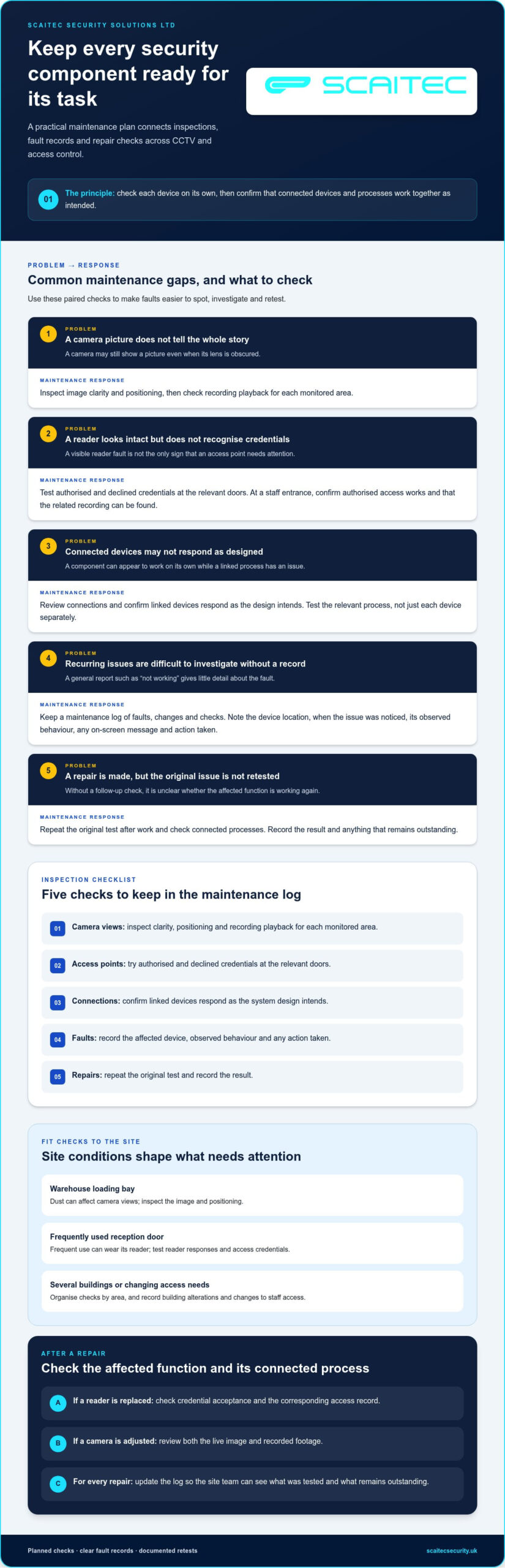
Maintenance helps keep each security component ready for its intended task. A camera may still show a picture even when its lens is obscured; an access reader may look intact but fail to recognise credentials. Keep a maintenance log of faults, changes and checks, giving the site team a useful record when recurring issues need investigation.
Start with an inventory of installed equipment and its location. Label cameras by entrance or area, identify access points by door, and note the role of each connected device. During inspections, test live views, playback, reader responses and alerts. At a staff entrance, for example, confirm that authorised access works and the related recording can be found.
Tailor maintenance to how the site operates. Dust at a warehouse loading bay can affect camera views, while frequent use of a reception door can wear its reader. Record environmental conditions, building alterations and changes to staff access. This helps prioritise checks and distinguish equipment faults from configuration issues or changing site requirements.
- Check camera views: inspect image clarity, positioning and recording playback for each monitored area.
- Test access points: try authorised and declined credentials at the relevant doors.
- Review connections: confirm that linked devices respond as the design intends.
- Record faults: note the affected device, observed behaviour and any action taken.
- Re-test repairs: repeat the original test after work, then record the result.
When reporting a fault, describe what happened rather than simply saying the system is “not working”. Include the device location, when you noticed the issue, any on-screen message and whether it recurs. For example, note if a camera feed drops after a door event. These details help narrow down the fault and plan repairs.
After a repair, test the affected function and any connected processes. If a reader is replaced, check credential acceptance and the corresponding access record. If a camera is adjusted, review both the live image and recorded footage. Update the maintenance log so staff know what was tested and what remains outstanding.
Plan maintenance around site access, critical entrances and the consequences of equipment being unavailable. A site with several buildings may need checks organised by area, whilst a single entrance can be prioritised around opening hours. The security system maintenance service is a relevant next step for arranging planned checks and keeping inspection records organised.
Remote monitoring and mobile app control
Remote monitoring and mobile access serve different purposes. A monitoring arrangement routes selected system events to a remote operator for assessment. An app gives authorised users access to selected functions on a connected device. For a South Yorkshire warehouse, an operator could review an alarm event whilst a site manager checks the premises’ status remotely.
Start by defining which events need attention and who should respond. A door forced open outside operating hours calls for a different response from an authorised entry during a delivery. Create a response plan that identifies the event, the responsible person and the next action. This reduces uncertainty when an alert arrives during a busy shift.
Remote monitoring depends on clear event information. Agree how the system identifies areas, doors and alarm types, then use those labels consistently. “Rear loading door” is more useful than “Zone 4” to a person unfamiliar with the building. Include a site contact process and ensure keyholders understand their responsibilities.
Manage app access carefully. Give each person an individual account where supported, and assign permissions according to their role. A facilities manager might need to view several areas, while a contractor may need access to one entrance for a specific task. Remove access when responsibilities change.
- Set alert priorities: distinguish urgent events from routine status messages.
- Define permissions: decide who can view, acknowledge or change each function.
- Agree response steps: record who receives an event and what they do next.
- Test the process: run a planned event and confirm the right people understand the alert.
Connectivity is part of the design. Remote access depends on a working connection between site equipment and the monitoring point or mobile device. Decide who reports a connection failure and how staff manage access during an outage. For example, the reception team should know the agreed manual process if remote access becomes unavailable.
Review the arrangement whenever the site changes. A new staff entrance, revised delivery routine or change in keyholders can make existing permissions and alert routes unsuitable. Update the access list, event labels and response instructions together, then test an example alert. This keeps procedures aligned with the building.
Before choosing remote monitoring, map the site’s users, event types and response responsibilities. Separate events that need an operator’s attention from those staff can manage themselves. This gives the arrangement a practical purpose, rather than adding app access without clear roles or response steps.
Residential, commercial and industrial applications
A suitable security layout starts with daily routines, not a standard equipment list. A home in Doncaster, a Sheffield office and a Rotherham workshop have different entrances, users and priorities. Map the areas to monitor, who needs access and which events staff or residents need to understand.
Residential properties
At home, start with the main entrance, accessible ground-floor doors and any separate garage or outbuilding. CCTV can help residents view cameras on an iPhone, while an intruder alarm offers a separate layer of protection. If household members have different routines, plan how each person will use the system and who can manage its settings.
Consider everyday tasks, too. A delivery at the front door, a family member arriving home and a tradesperson entering by arrangement each create different access needs. Focus camera views on relevant areas and set clear permissions for anyone using the system. This helps the security arrangement suit the household without complicating routines.
Commercial premises
For an office, shop or community building, identify public areas, staff-only rooms and entrances used outside normal opening hours. Access control can organise entry by role, while CCTV provides visual context around selected doors. A reception entrance, for example, may need a different arrangement from a stockroom or staff entrance.
South Yorkshire businesses may operate from one building or several sites across Barnsley, Doncaster, Rotherham and Sheffield. List each location, its operating pattern and who is responsible for security decisions. This helps establish consistent procedures while recognising that each building has its own layout and access requirements.
Industrial sites
A workshop or warehouse may include loading areas, stores, production spaces and office entrances. Map vehicle and pedestrian routes separately, then identify where access should be limited. For example, a delivery entrance may need clear oversight, while a restricted store needs permissions suited to its users.
Industrial environments raise practical design questions. Dust, changing light, machinery and building alterations can affect equipment placement and maintenance. Record these conditions during planning, and decide how staff will report an obstructed camera view or faulty access point.
- Homes: prioritise household routines, entrances and clear user permissions.
- Commercial sites: distinguish public, staff and restricted areas.
- Industrial premises: map loading routes, work zones and changing site conditions.
Across all three settings, begin with a site plan and mark doors, boundaries, busy areas and restricted rooms. Add the users who need access and the events that require review. That practical record gives an installer a clearer basis for tailoring the system to the property and its operation.
Which South Yorkshire companies install integrated CCTV, intruder alarms and access control?
Choose an electronic security installer that can design CCTV, intruder alarms and access control as a coordinated project. Integration involves more than fitting separate devices. The system design, installation and commissioning all need to work together so each component performs its intended role.
For sites in Barnsley, Doncaster, Rotherham or Sheffield, document the buildings and their security priorities. A site plan can show entrances, staff-only areas, delivery routes and locations needing camera coverage. Include how the premises operate, who uses each entrance and which events require a response.
Use that information to describe the work clearly. A warehouse, for example, might need CCTV at a loading entrance, controlled staff access and an intruder alarm for closed periods. An office may need a different design, with visitor entry and staff-only rooms addressed.
Ask for a written proposal explaining the project stages and how the components connect. It should cover design, installation, commissioning tests and maintenance. Look for clear device locations, access permissions and examples of how the system handles routine and unusual events.
- Design: check that cameras, alarms and controlled doors are mapped to site needs.
- Installation: review how work will be organised around building access and operations.
- Commissioning: expect the completed system to be tested as connected equipment.
- Aftercare: understand how checks, faults and repairs will be recorded.
Compare proposals on the same basis. Give each provider identical site details and requested functions, then compare equipment, installation steps and commissioning records. Ask how access permissions relate to camera views and how staff will use the system after handover. This makes differences between designs easier to assess.
Coverage matters across South Yorkshire, especially when an organisation operates at several locations. Include every relevant address, building and entrance in the project brief. A Rotherham site with a separate storage building, for instance, may need distinct plans for each area and its users.
Focus questions on project delivery: who manages the schedule, how installation quality is checked, and what commissioning records are provided? Clear answers help show whether the proposal addresses the whole system or treats CCTV, alarms and access control as unrelated installations.
The role involves managing integrated security projects such as access control and IP CCTV installations across Yorkshire and commutable areas. When assessing a provider for a multi-part brief, ask whether project management covers the connected systems from planning through handover, and whether the stated service area includes each site. Confirm who will coordinate installation and commissioning, and request a clear account of how the proposed equipment is intended to work together.
Share the same site information and required functions with each candidate. Ask what parts of the project they will manage, how they will coordinate cameras, doors and alarms, and what records you will receive at completion. This gives you a practical basis for comparing scope, coverage and aftercare.
Scaitec Security Solutions: CCTV Systems
Scaitec Security Solutions Ltd can help South Yorkshire homes and businesses plan CCTV around their site and security priorities. The company designs, installs and maintains electronic security and fire systems. Its CCTV installation and maintenance service can be considered alongside Access Control systems, Intruder Alarms and Fire Alarm installation, all of which can be planned for the property’s needs.
For example, a business planning camera coverage around staff entrances can consider how CCTV fits with its access arrangements. A homeowner may want cameras as part of a broader security plan. The right system depends on the property, its layout and the requirements identified during planning.
Contact Scaitec Security Solutions to discuss CCTV for your property and the security needs it should address.
Take the next step towards a site-specific plan
Turn your security priorities into a clear brief. Note which areas matter most, how people use the site and what staff need to do when an event occurs. This gives planning a practical starting point and helps shape a system around real routines, rather than adding equipment without a defined purpose.
For organisations planning integrated security systems across South Yorkshire, Scaitec Security Solutions offers CCTV installation and maintenance, Intruder Alarms and Access Control systems. These services can be planned around your property and the way it operates, whether you’re reviewing an existing arrangement or planning a new installation.
A considered plan can also make future changes easier to assess. As the site’s use or access needs evolve, a clear record of priorities helps guide decisions about the next stage of security provision.
Start with your property’s needs, then contact Scaitec Security Solutions to discuss a system that suits your plans.
Frequently Asked Questions
What services do integrated security systems companies in South Yorkshire provide?
Security systems for South Yorkshire properties can include CCTV, intruder alarms, access control, fire alarm systems and remote monitoring. Scaitec Security Solutions provides these services alongside system maintenance. The right combination depends on the property and how people use it. A Rotherham business, for example, may prioritise controlled staff access, while a Sheffield home may focus on CCTV and an intruder alarm.
What ongoing monitoring and maintenance costs should businesses expect?
Ongoing costs depend on the equipment, site layout, monitoring arrangements and maintenance required. Remote monitoring charges can be recurring, whilst maintenance may be arranged periodically or annually. Scaitec provides remote monitoring 24/7; the scope of monitoring and system upkeep affects the overall quote. The price depends on the case and is given after a quote request, with system requirements and service scope shaping the cost.
How do CCTV, alarms, access control and fire systems integrate?
Integration starts with a coordinated design that connects each system’s role with the site’s procedures. For example, access control can manage staff entry, CCTV can provide visual context, and an intruder alarm can protect the premises when closed. Scaitec’s Fire Alarm installation service meets current British Standards and can form part of the overall plan, alongside clear staff response procedures. Test each intended interaction during commissioning.
What are the data protection rules for CCTV in the UK?
Plan camera views to cover required entrances without unnecessarily covering neighbouring spaces. Set clear permissions for viewing footage and entry logs, decide how long records are needed, and identify who handles review requests.
Protect Your Business
Protect Your People
Book Your FREE Site Protection Survey

Since pioneering Scaitec Security Solutions in 2005, Paul Scaife, with his roots in the industry dating back to 1994, has distinguished the firm as a leading provider of bespoke fire and security solutions, servicing clients across Sheffield, Rotherham, and surrounding areas.
His leadership, underpinned by accreditation from the Security Systems and Alarms Inspection Board, ensures that Scaitec surpasses client expectations by blending advanced technology with a deep understanding of their unique needs.
Paul's ethos champions innovation and efficiency, driving Scaitec to deliver tailored, cutting-edge solutions that enhance safety and operational ease.
Discover more about Paul’s commitment to excellence on LinkedIn.