
Table of Contents
Imagine the sinking feeling of reviewing your security footage after a suspicious incident, only to find a “no data” message staring back at you. When your digital eyes fail, the sense of vulnerability can be overwhelming, especially if you’re worried about losing critical evidence. If you’re searching for a CCTV camera not recording fix Rotherham, you’re likely facing the frustration of a system that’s stopped doing its one essential job. We know how unsettling it feels when your property’s primary line of defence goes dark without warning.
In this guide, we’ll help you discover the most common reasons your CCTV system has stopped recording and show you how to restore your property’s security today. We’ll explore the technical hurdles that often cause these failures, from hard drive wear to configuration errors in your DVR or NVR. By the end of this article, you’ll understand why the failure occurred and have a clear, methodical plan to get your surveillance back online. Whether it’s a simple cable issue or a need for professional maintenance, we’re here to guide you back to total peace of mind whilst ensuring your system remains fully compliant.
Key Takeaways
- Identify the critical difference between a simple connection loss and a deeper recording failure within your DVR or NVR system.
- Follow a methodical troubleshooting process, including soft reboots and hard drive status checks, to restore your security functionality.
- Implement a CCTV camera not recording fix Rotherham residents can rely on to address power supply fluctuations and storage hardware wear.
- Learn how South Yorkshire’s specific environmental factors, such as dampness, can lead to connector corrosion and disrupt your surveillance.
- Discover the long-term benefits of professional maintenance for ensuring your system remains compliant and provides the evidence you need.
Why has my CCTV camera stopped recording? Common causes
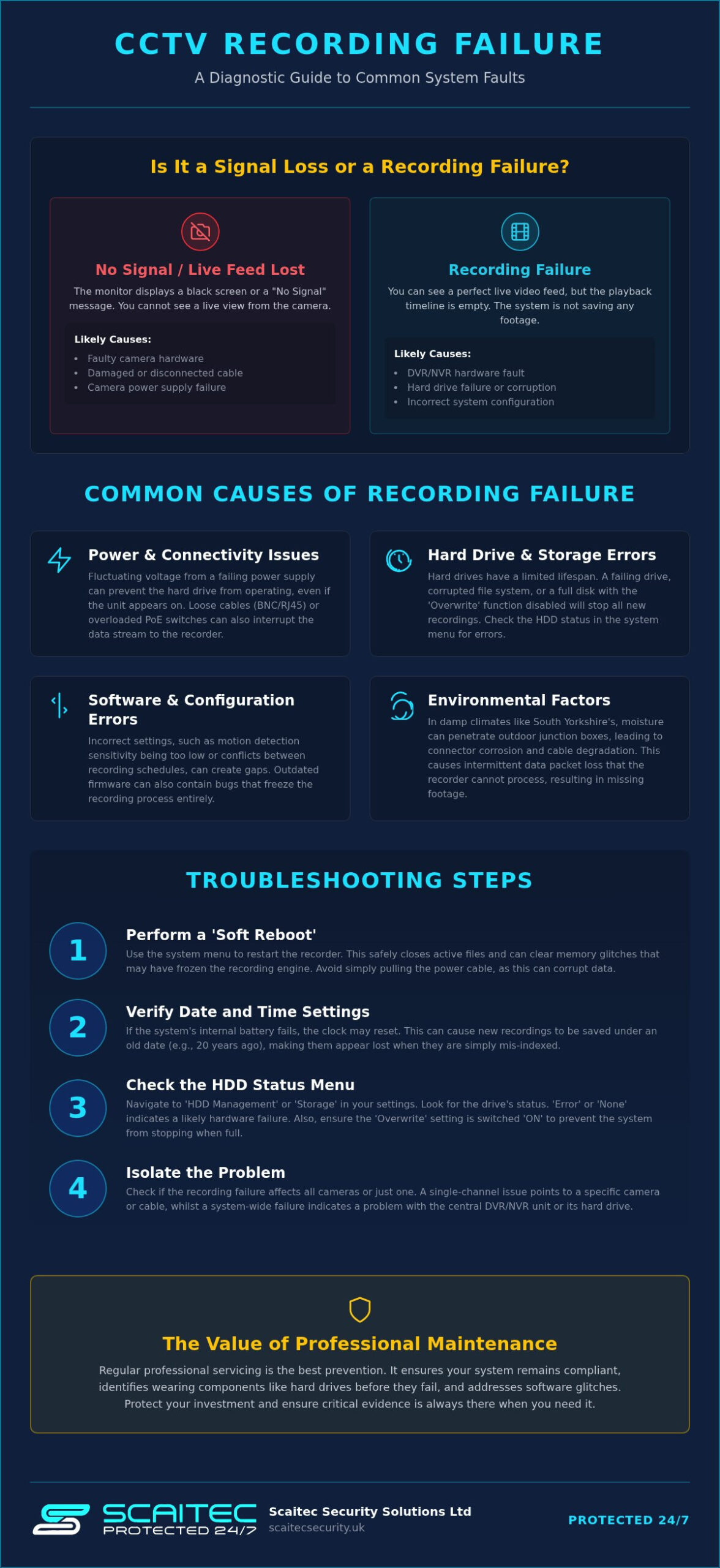
When your monitor displays a live feed but the playback timeline remains empty, it’s often confusing. Understanding the core mechanics of Closed-circuit television (CCTV) is helpful here. A “no signal” error usually points to a camera or cable fault, whereas a recording failure is typically an issue with the DVR, NVR, or the storage media itself. If you’re looking for a CCTV camera not recording fix Rotherham properties often require, start by checking if the recording icon, usually a red dot or a cassette symbol, is visible on the live screen. If it’s missing, your system is likely failing to write data to the disk.
Power supply issues are a frequent culprit. While the recording unit might have enough power to stay on, fluctuating voltage can cause the internal hard drive to spin down or disconnect. This results in a system that looks operational but fails to archive footage. Additionally, storage capacity settings play a vital role. Most systems are configured to “Overwrite” once the disk is full. If this setting is accidentally disabled or the file system becomes corrupted, the recorder will simply stop when it reaches 100% capacity.
In South Yorkshire, our damp climate can be harsh on outdoor infrastructure. Over time, moisture ingress into external junction boxes leads to cable degradation. This doesn’t always kill the signal immediately; instead, it can cause intermittent data packets that the recorder cannot process. This leads to frustrating gaps in your security history just when you need the evidence most.
Power and connectivity interruptions
Start by inspecting the power LED on your DVR or NVR unit. A flickering or dim light often suggests a failing power brick that can’t provide the “peak” current required for hard drive operations. In modern IP systems, ensure your PoE (Power over Ethernet) switches aren’t overloaded. Insufficient wattage can prevent cameras from sending high-bandwidth data to the recorder. We often find that loose BNC or RJ45 connectors are to blame; even a slight vibration can disrupt the connection enough to stop the data stream whilst leaving the camera seemingly “online”.
Software and configuration errors
Sometimes the hardware is fine, but the logic is flawed. Incorrect motion detection sensitivity can mean the system ignores legitimate movement, leading to “missed” events. Similarly, conflicts between scheduled recording and continuous recording modes can create “dead zones” in your timeline. Firmware bugs occasionally freeze the recording engine entirely. Regular system maintenance helps identify these software glitches before an incident occurs, ensuring your property remains protected and your system stays reliable.
Troubleshooting the recording failure: A step-by-step guide
Before requesting a professional CCTV camera not recording fix Rotherham residents can often resolve minor system glitches by following a methodical sequence of checks. We recommend starting with a ‘Soft Reboot’. Unlike pulling the power cable, which can cause data corruption, a soft reboot through the system menu allows the recorder to close active files and clear temporary memory glitches. This often restarts a frozen recording engine without risking the integrity of your existing footage.
Once the system restarts, verify your date and time settings immediately. If your system clock has reset due to a depleted CMOS battery, your footage might be indexed under a date from twenty years ago. This makes it appear as though the system isn’t recording when, in reality, the data is simply buried. Maintaining an accurate clock is also essential for legal compliance and adhering to your specific data retention period, ensuring evidence remains accessible when you need it most.
Finally, test individual cameras to see if the failure is universal. If only one channel is missing, the issue likely lies with that specific camera’s power supply or cable. If every channel has stopped archiving, the fault is almost certainly centralised within the DVR or NVR unit.
Checking the system status menu
Navigate to the ‘HDD Management’ or ‘Storage’ tab in your system settings to view the health of your drive. If the status displays as ‘Uninitialised’, the recorder recognises the hardware but cannot write to it; you may need to format the drive. A status of ‘Error’ or ‘None’ typically indicates a hardware failure that requires professional attention. Always ensure the ‘Overwrite’ toggle is switched to ‘ON’ so the system can automatically loop footage once the storage capacity is reached.
Physical inspections for Rotherham properties
Listen closely to your recording unit for any unusual clicking or grinding noises, as these are clear indicators of a mechanical hard drive failure. It’s also vital to check the unit’s cooling fans for dust build-up. In many Rotherham homes, recorders are kept in lofts or cupboards where dust accumulates quickly, leading to overheating and system shutdowns. Whilst you’re checking the hardware, look for signs of pest damage to cables in lofts or basements, as rodents can easily chew through unprotected wiring and disrupt your security. If you find physical damage that you aren’t comfortable fixing yourself, our team provides reliable corrective services to restore your peace of mind.
Hard drive failures and data storage issues
The hard drive is the mechanical heart of your security system, and it’s often the first component to show signs of fatigue. Unlike a home computer that might only run for a few hours a day, a security recorder is under constant operational strain. It must process multiple high-definition video streams simultaneously, every second of every day. If you’re investigating a CCTV camera not recording fix Rotherham properties frequently require, the issue often stems from a storage medium that has simply reached the end of its reliable service life.
Mechanical hard drives rely on rapidly spinning platters and moving read/write heads. Over time, the physical friction and heat generated by 24/7 operation lead to “bad sectors” where data can no longer be stored. When these sectors multiply, the recorder may freeze, reboot, or fail to archive new footage entirely. Whilst modern recorders are resilient, they cannot overcome the physical limitations of a failing disk. Identifying these issues early is vital to ensure you don’t lose critical evidence when an incident occurs.
If your system is displaying storage errors or failing to recognise the drive, our team at Scaitec Security Solutions provides Scaitec Servicing and Corrective Maintenance to professionally diagnose and replace faulty hardware. We ensure your system is restored with the correct specifications for your specific security needs.
Surveillance-grade vs. Desktop HDDs
We frequently encounter systems where a standard desktop hard drive has been used as a cheap replacement. This is a significant risk. Desktop drives are designed for a 5-day, 8-hour duty cycle. In contrast, surveillance-grade drives, such as WD Purple or Seagate SkyHawk, are engineered specifically for the high-demand environment of CCTV systems. These specialised drives handle heat and vibration far better, particularly in the small, poorly ventilated enclosures where many Rotherham residents keep their recorders.
When to format and when to replace
Sometimes, a recording failure is caused by a corrupted file system rather than a physical break. In these cases, a full format through the system menu can clear the errors and restore functionality. However, if you hear a rhythmic clicking or grinding sound coming from the unit, formatting will not help. This “click of death” is a definitive sign of mechanical failure. For modern NVR applications, we may recommend transitioning to high-end SSDs. These have no moving parts and offer superior reliability for specific commercial setups where data integrity is the absolute priority.
Preventative maintenance: Keeping your security system online
Waiting for your system to fail before taking action is a risky strategy that can leave your property vulnerable at the worst possible moment. Whilst a DIY CCTV camera not recording fix Rotherham residents can perform might resolve a temporary glitch, it doesn’t address the underlying wear and tear that leads to long-term instability. Regular health checks are the most effective way to ensure your system remains a reliable guardian for your home or business, preventing the frustration of discovering a recording gap after an incident has occurred.
In South Yorkshire, the pervasive dampness is a constant threat to electronic components. Moisture often finds its way into external connectors, causing subtle corrosion that eventually breaks the data path to your recorder. Professional maintenance also ensures you stay on the right side of the law. With the recent updates in the Data (Use and Access) Act 2025, the Information Commissioner’s Office (ICO) has strict expectations regarding system upkeep and data integrity. Failing to maintain your system doesn’t just risk your security; it could also invalidate your insurance or lead to compliance issues if your footage is required for legal purposes.
By choosing Scaitec Preventative Maintenance, you benefit from a systematic approach that identifies these hidden risks before they escalate into a total system failure.
The Scaitec maintenance checklist
Our approach to maintenance is methodical and thorough. We don’t just check if the cameras are on; we verify that the focus is pin-sharp and lenses are free from grime to ensure any captured evidence is usable. We also test your battery backup systems to guarantee that recording continues during local power cuts. Firmware updates are another critical step, as they patch security vulnerabilities and fix the software bugs that can cause recording engines to freeze without warning.
Local environmental factors in Rotherham
Rotherham’s unique landscape presents specific challenges for surveillance hardware. Spiders are particularly fond of the warmth emitted by IR sensors, weaving webs that trigger constant false motion alerts and fill up your hard drive with useless footage. For systems installed in uninsulated outbuildings or commercial yards, extreme winter temperatures can cause internal components to contract and fail if they aren’t properly shielded. Additionally, the industrial dust common in parts of South Yorkshire can clog internal cooling fans, leading to the overheating issues we previously identified. Our local expertise allows us to anticipate these regional problems and provide tailored solutions that keep your property safe year-round.
Book your preventative maintenance visit today
Professional CCTV repairs and servicing in Rotherham
When the methodical checks we’ve discussed don’t restore your system, professional intervention is the only way to ensure your property remains protected. Choosing a specialist for a CCTV camera not recording fix Rotherham residents can trust is about more than just finding someone to swap a cable. At Scaitec Security Solutions, we’ve operated as an independent local firm since 2005, building a reputation for technical proficiency that goes far deeper than surface-level repairs. Our engineers are trained to diagnose complex hardware failures, such as motherboard capacitor issues or inconsistent power supply outputs, which often mimic simple storage errors.
We believe in a holistic approach to security. This means we don’t just look at the component that’s failed; we examine the entire ecosystem to understand why the failure occurred. Whether it’s a faulty voltage regulator in your DVR or a high-bandwidth bottleneck in your NVR’s network switch, we have the expertise to identify the root cause. This methodical process prevents repeat failures and ensures your system provides the steadfast reliability you expect from a professional security installation.
Our approach to corrective maintenance
We understand that a system that isn’t recording is a critical security vulnerability. That’s why we prioritise fast response times for corrective maintenance across Rotherham and Sheffield. Our engineers arrive equipped with state-of-the-art diagnostic tools and a comprehensive range of spare parts to get your system back online during the first visit whenever possible. If you’re considering an upgrade rather than a repair, you can read more about our standards in our guide to Expert CCTV Installation in Rotherham.
Residential and Commercial expertise
Our team provides tailored support for both South Yorkshire families and the local business community. For Rotherham small businesses and retail shops, we understand that CCTV is often a requirement for insurance compliance and staff safety. We work efficiently to minimise disruption to your daily operations whilst ensuring your system meets all current UK regulations. For our residential clients, we offer a discreet and professional service that restores your home’s protective shield without unnecessary fuss. Booking a system health check is the first step toward restoring your peace of mind and ensuring your evidence is there when it matters most.
Contact Scaitec Security Solutions for a CCTV repair quote
Restore your property’s protective shield today
Restoring your system’s recording functionality is essential for maintaining a robust security posture. We’ve explored how identifying the difference between a simple software glitch and a mechanical hard drive failure is the first step toward a permanent resolution. Whether you’ve performed a soft reboot or checked your storage settings, ensuring your evidence is captured accurately remains the priority. If you still require a CCTV camera not recording fix Rotherham experts can provide, seeking professional support is the most reliable way to restore your system’s integrity.
Our team has served as an independent Rotherham specialist since 2005, providing expert technical support across South Yorkshire. We pride ourselves on delivering tailored security solutions and reliable aftercare that prioritises your peace of mind. By addressing storage wear and environmental factors now, you ensure your system is ready to provide critical evidence whenever it’s needed.
Book your CCTV system health check with Scaitec Security today
Don’t leave your property’s safety to chance. Taking a proactive approach today ensures your surveillance remains a vigilant protector for years to come.
Frequently Asked Questions
Is it normal for a CCTV camera to stop recording after a power cut?
Yes, it is common for systems to struggle after a power surge or sudden shutdown. Whilst most recorders are designed to restart automatically, a sudden loss of power can cause the hard drive’s file system to become corrupted. This often requires a professional CCTV camera not recording fix Rotherham residents can rely on to ensure the internal components haven’t sustained permanent electrical damage during the outage.
How do I know if my CCTV hard drive has failed?
You can identify a failed drive by listening for rhythmic clicking sounds or checking the system’s storage menu for “Error” or “HDD Not Found” messages. If your playback timeline is completely blank despite the cameras showing a live feed, the drive has likely reached the end of its mechanical life. We recommend a professional health check to confirm if a replacement surveillance-grade drive is necessary for your system.
Can I fix a CCTV recording issue by simply resetting the DVR?
A soft reset can clear temporary software glitches, but it won’t resolve underlying hardware issues. If the recording failure is caused by a physically failing hard drive or a degraded cable, the problem will quickly return. For a long-term CCTV camera not recording fix Rotherham homeowners should look beyond a simple reboot and consider a full system diagnostic to identify the root cause of the interruption.
Why is my CCTV only recording during the day but not at night?
Night recording requires significantly more power to run the infrared (IR) illuminators on your cameras. If your power supply unit is aging or under-specified, it may provide enough current for daytime use but fail when the IR lights switch on at dusk. This power drop often causes the recorder to stop writing data to the hard drive until the sun rises and power demand decreases again.
How often should I have my CCTV system serviced in Rotherham?
We recommend that domestic systems in Rotherham and Sheffield are professionally serviced at least once a year. Commercial properties often require more frequent inspections, sometimes every six months, to maintain insurance compliance and ensure 24/7 reliability. Regular maintenance helps identify issues like connector corrosion caused by South Yorkshire’s damp weather before they lead to a total loss of critical security footage.
What happens if my CCTV isn’t recording and an incident occurs?
If your system isn’t recording during an incident, you lose vital evidence and may face difficulties with insurance claims. Under UK GDPR and the Data Protection Act, businesses also have a responsibility to ensure their security systems are functioning correctly. A failure to provide footage could lead to legal complications or a breach of your duty of care to staff and visitors on your premises.
Can a weak Wi-Fi signal stop my wireless CCTV from recording?
Yes, a weak or unstable Wi-Fi signal will definitely disrupt the recording process for wireless systems. If the data packets from the camera cannot reach the recorder or the cloud storage due to interference, you’ll experience significant gaps in your footage. In many Rotherham homes with thick stone walls, we often recommend switching to a wired PoE system to ensure a constant and reliable data stream.
Will formatting my CCTV hard drive delete all my old footage?
Yes, formatting your hard drive will permanently erase all existing footage stored on the device. This process is often used to clear file system errors or “uninitialised” drive statuses, but it should only be done after you’ve backed up any critical evidence. If you’re unsure whether a format is the right solution, our engineers can provide expert guidance to avoid unnecessary data loss during the repair process.
Protect Your Business
Protect Your People
Book Your FREE Site Protection Survey

Since pioneering Scaitec Security Solutions in 2005, Paul Scaife, with his roots in the industry dating back to 1994, has distinguished the firm as a leading provider of bespoke fire and security solutions, servicing clients across Sheffield, Rotherham, and surrounding areas.
His leadership, underpinned by accreditation from the Security Systems and Alarms Inspection Board, ensures that Scaitec surpasses client expectations by blending advanced technology with a deep understanding of their unique needs.
Paul's ethos champions innovation and efficiency, driving Scaitec to deliver tailored, cutting-edge solutions that enhance safety and operational ease.
Discover more about Paul’s commitment to excellence on LinkedIn.