
Table of Contents
A security system without monthly fees can send alerts directly to your smartphone or control panel, without recurring payments for third-party monitoring or cloud storage. It can be a practical option, but reliability depends on the system’s configuration and who responds when an alert arrives. The trade-off is straightforward: you may avoid a subscription, but you take a more active role in monitoring.
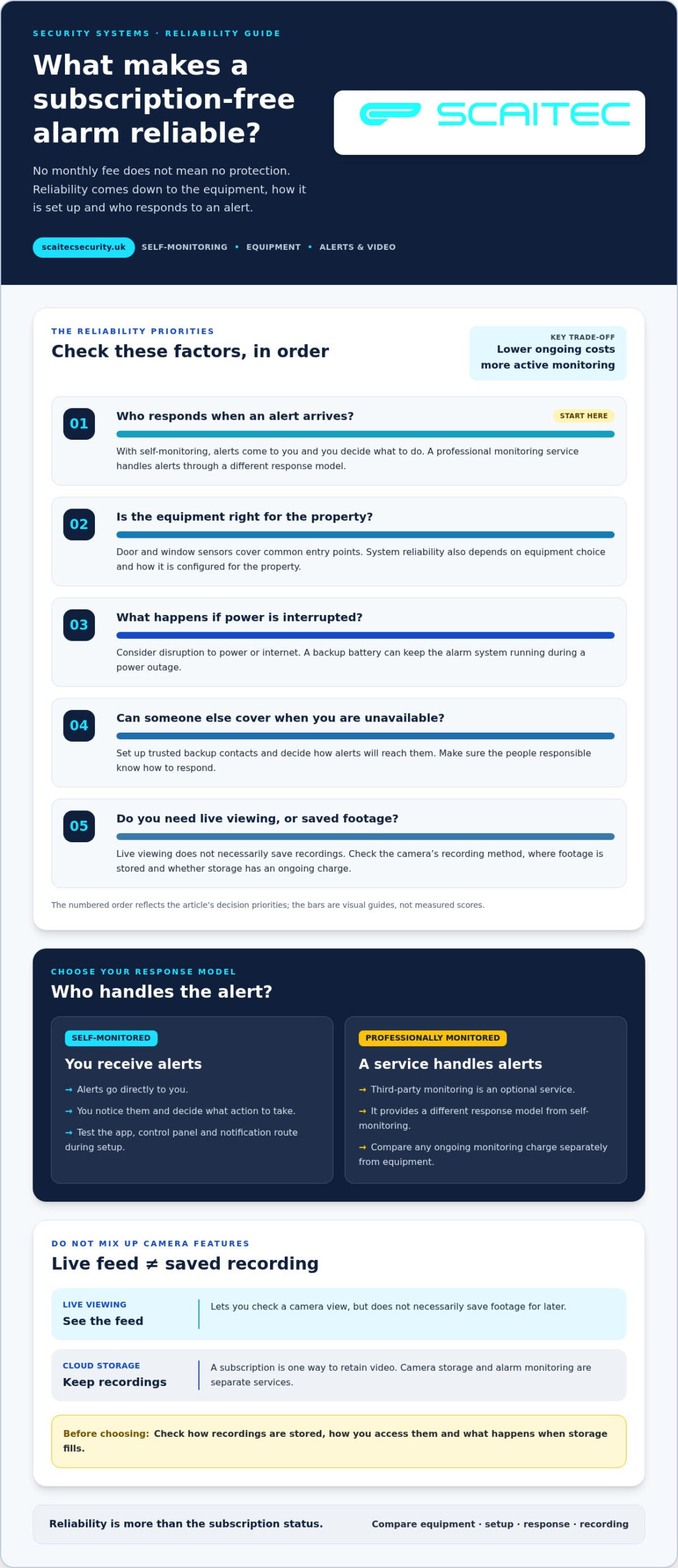
It’s reasonable to ask whether lower ongoing costs mean weaker protection. A system without a subscription can still provide useful alerts, but consider what happens during a power or internet disruption, who can act if you’re unavailable, and whether video features involve extra costs.
This comparison explains how system types differ in reliability, equipment and installation costs, monitoring, alerts, backup contacts and video. You’ll also see how to weigh self-monitoring against optional professional monitoring, so you can choose an approach that suits your property, budget and comfort with managing alerts.
Key Takeaways
- Subscription-free systems can send alerts directly to your phone, but you’ll need to decide who responds when one arrives.
- Compare the full setup cost by considering equipment, installation and any ongoing charges for monitoring or video storage.
- Choose monitoring that suits your routine: self-monitoring gives you control, while professional monitoring can provide a different response model.
- Set up trusted backup contacts and decide how alerts will reach them when you’re unavailable.
- Check what camera viewing and recording features are available without a subscription before choosing a system.
Are Non-Subscription Alarm Systems Secure & Reliable?
A subscription-free alarm can send real-time notifications to a smartphone or control panel without recurring monitoring or cloud-storage payments. Its reliability still depends on the equipment, how it is set up and who responds when an alert arrives.
Features With and Without Subscriptions
Without a subscription, an alarm system can still detect entry and notify you directly. Door and window sensors cover common entry points, while backup batteries can keep the system running during a power outage. A subscription may add third-party monitoring or cloud video storage, but these are separate features, not proof that the basic alarm works better.
Before choosing, list the functions you need: detection, alerts, remote control, monitoring and video access. Then compare the equipment and any premium features against that list. An upgrade makes sense only if it adds a feature you’ll use, such as monitored response or video recording.
For UK insurance, check the alarm conditions stated in your policy and how your insurer handles discounts. Subscription status alone does not show whether a system meets those conditions. Compare the policy requirements with the system’s installation and monitoring arrangements.
Subscription-Free Cameras and Cloud Storage
Security cameras can provide viewing without a required subscription, but recording and storage depend on the equipment and its features. Live viewing lets you check a camera feed, but does not necessarily save footage for later. Cloud-storage subscriptions are one way to retain recordings; some equipment may offer another recording method.
Before buying cameras, distinguish live viewing from saved footage. Consider where recordings are stored, how you access them and what happens when storage fills. A premium plan may include video recording, but cloud storage and alarm monitoring are separate services.
Alarm operation doesn’t have to stop when a subscription ends. A self-monitored system can send alerts directly, but you must notice them and decide what action to take. Test the app, control panel and notification route during setup, then make sure the people responsible know how to respond. For a workplace, consider how the alarm fits the wider business security arrangements.
| Option | Core protection | Alerts and response | Video storage |
|---|---|---|---|
| Self-monitored alarm | Entry sensors | You receive alerts and act | Separate camera feature |
| Alarm with professional monitoring | Entry sensors | Monitoring service handles alerts | May be separate |
| Camera with live viewing | Visual checks | You view the feed | Live viewing only |
| Camera with cloud storage | Visual checks | Alerts depend on equipment | Recordings stored online |
Choose the option that meets your response needs first, then compare its recording method and ongoing commitments.
Equipment prices and installation costs
The upfront cost depends on the equipment, property layout and installation method. A security system without monthly fees can still involve initial equipment and fitting costs, so compare the complete setup rather than the price of an alarm kit alone. Cameras, sensors, mounting, configuration and future upgrades can all affect the specification.
Professional Installation and Support
Professional installation includes fitting equipment and configuring the system for the property. With a DIY kit, you handle placement, setup and testing yourself. A complex layout may need more sensors, camera positions or integration with existing equipment, each of which affects the work involved.
The price depends on the property and specification and is provided after a quote request. Equipment quantities, camera locations, installation complexity and integration requirements all shape the quote. Ask for a clear scope that separates equipment, installation and ongoing support charges.
Wireless Sensors and DIY Installation
Wireless sensors can avoid rewiring, which may make them suitable for DIY installation. Placement still matters: fit a door contact at the entry point, and give a motion sensor a clear view of the area it covers. Follow the equipment instructions and test each zone after setup.
Self-installation can reduce installation work, but the equipment still has a cost. Check what the kit contains before comparing it with an Amazon listing or another package. A starter kit may not include every sensor or camera the property needs, so additional equipment can change the total. For a security system without monthly fees, include optional storage or monitoring costs only if you choose those features.
Wireless does not automatically mean no drilling. Some sensors can be attached without rewiring, but cameras and control panels may need secure mounting or a suitable power source. Check the mounting method for each item, then consider whether the walls, surface materials and access affect placement. A no-drill setup may limit where equipment can go.
Camera costs depend on the number of cameras, the areas to cover, mounting requirements and recording arrangements. Installing one camera at a front entrance differs from covering several indoor and outdoor areas. If recorded footage matters, include storage and any subscription charge in your comparison. Live viewing and saved video are different functions. A security system without monthly fees avoids recurring payments for these services only when you choose equipment and features that do not require them.
For a like-for-like comparison, write down the equipment and work included in each option:
- Alarm equipment: sensors, control panel and any additional zones.
- Camera equipment: camera positions, mounting and recording method.
- Installation: fitting, configuration, motion detection tests and system integration.
- Ongoing costs: monitoring, storage or support charges, if selected.
For workplace projects, the business security arrangements can help frame equipment and integration needs around the site. Choose DIY for a straightforward layout you can install and test; choose professional installation when coverage, mounting or integration needs more planning.
DIY self-monitoring and optional professional monitoring
Monitoring determines who receives an alarm signal and who needs to respond. Compare the equipment separately from the response service: an app-controlled system and a monitored plan work differently.
In the UK, a system without recurring monitoring fees is typically self-monitored: alerts go to you, and you decide what to do. Professional monitoring is a separate service, usually offered through a paid plan rather than included in a one-off purchase.
Wireless DIY alarms and professionally installed systems can both detect activity. Their main differences are setup, support and response arrangements. With a DIY system, you position and configure the equipment; professional installation includes fitting and system setup.
One-off purchase systems in the UK are generally DIY alarm kits with app or web controls. Before choosing, compare the included sensors, remote arming, alert handling and any separate monitoring option.
DIY Self-Monitoring
A self-monitored home security system sends alerts to your phone or control panel. Some systems let you arm or disarm remotely through an app or web interface. This approach suits people who can check notifications and take responsibility for follow-up. For example, a household might receive an entry alert and contact emergency services itself.
Compare equipment and response features, not just the control app. Check whether the system supports the sensors you need, whether alerts reach the right people and how each person will respond. An indoor camera may help you assess an alert, but viewing footage does not replace contacting emergency services.
Optional Professional Monitoring
Professional monitoring routes alarm signals to a monitoring service, rather than leaving you to manage every alert. The recurring charge pays for a different response arrangement, not simply extra alarm equipment.
Ask what the monitoring service does after receiving an alert. Professional monitoring is not a promise of automatic police attendance; the response depends on the service process and circumstances. Compare the monitoring terms with the app alerts, video access and equipment included.
Wireless DIY and Professional Installation
With a wireless DIY alarm, you place the sensors and configure the system yourself. You can adapt it to your household’s security needs, but you manage setup, testing and app access. Professional installation shifts fitting and configuration to an installer, which can suit a property with several entry points or a more involved layout.
For either approach, map the doors and windows first, then match sensors to those entry points. Test each sensor and notification route after setup. Installation method alone does not determine whether monitoring is included; the response arrangement is a separate choice.
One-Off Purchase Systems
A one-off purchase usually means buying the alarm equipment outright and choosing self-monitoring. Look for a kit with the sensors and control method your property needs, then check whether remote arming and phone alerts work without ongoing monitoring.
Use this comparison before deciding: DIY self-monitoring gives you direct alerts and personal responsibility; professional monitoring adds a monitoring service and recurring plan; professional installation changes who fits and configures the equipment. Choose according to who can respond, your home’s layout and the level of ongoing service you want.
Self-monitoring alerts and backup contacts
With a self-monitored alarm, alerts go to you rather than an automatic response service. If the situation requires it, you must contact emergency services yourself. As a practical backup, ask a trusted person to receive alerts when you’re travelling, unavailable or unable to check your phone.
Systems without monthly fees do not all use the same connection. Some rely on Wi-Fi or broadband for app alerts and live camera streaming, while a landline is not a universal requirement. Check which connection the equipment uses and how alerts work if that connection drops.
Plan who receives each alert
Set up the main user’s app notifications first and test them with a harmless system test. Add a trusted backup contact if the system allows multiple users. Agree what that person should do if you do not answer, such as calling you first or contacting emergency services if there is an immediate concern.
Keep contact details current. If you change phones or a family member stops acting as a backup, update the system’s user list and test a new alert. A notification sent to an old number cannot help the person responsible for responding.
Connection and backup options
Wi-Fi supports app features such as remote status checks and live video, while cellular connections can provide another communication route on compatible equipment. Cellular backup is a separate capability, not a standard feature of every alarm. Check what the system uses and what happens during a broadband or power interruption.
Some systems can send call alerts as well as app notifications. These provide another way to receive an alarm message, but do not remove the need to act. Keep the account’s contact numbers up to date, and make sure anyone receiving a call understands which property and event it concerns.
Camera alerts and AI detection
Security cameras can combine motion alerts with live streaming, helping you assess a notification before deciding what to do. For example, a motion alert at a back entrance can prompt you to view that camera feed. Streaming and saved recordings are different functions, so check both when comparing camera features.
Where a camera system includes AI detection, it can classify activity, for example by distinguishing people from other movement. This may make alerts more relevant, but it does not contact emergency services or replace a backup contact. Review the detection settings and test them in ordinary conditions, such as someone walking past the entrance.
Set up a reliable alert routine
Use this simple sequence: enable app alerts, add a trusted backup, test the notification route, then review connection and camera settings. For a smart home, include the phone, control panel and any linked security cameras in the test. Confirm that each intended recipient receives the alert and knows the agreed next step.
A security system without a subscription is most practical when someone can monitor alerts and respond promptly. Decide who is responsible during work, sleep and travel, then update the contact plan whenever those routines change.
Push notifications and video streaming
Notifications and video streaming serve different purposes in a home security setup. A push notification tells you an event has occurred; a live stream lets you view a camera feed. Compare both functions on the devices you’ll use, such as a phone at work or a tablet at home.
Start by identifying the events that matter. A door sensor might trigger an entry alert, while a camera may send a motion notification. Check how each event appears in the app, whether the alert identifies its source and whether you can open the relevant camera feed directly.
Live viewing is not the same as recording. A stream lets you see what is happening at that moment, while a recording can be reviewed later. Cloud storage keeps video online, but access, retention and included clips depend on the equipment and plan. Compare these as separate features, not as one bundled promise.
Some systems advertise free cloud video clips. Treat “free” as a feature to compare, not a promise of unlimited recording. Check clip length, how many clips can be saved, how long they remain available and whether cloud access requires an account or upgrade. Short event clips may suit alert reviews, while longer footage can provide useful context.
Compare camera and notification features
Resolution affects image detail, but camera position matters too. A high-resolution view aimed at a bright window may show less useful detail than a well-positioned camera covering an entrance. Compare sample views in daylight and at night, and consider the area each camera needs to cover.
Before choosing, review these features individually:
- Notifications: which sensors or camera events trigger an alert.
- Live streaming: whether you can open a feed from the alert.
- Recording: whether footage is saved locally or to cloud storage.
- Free clips: their length, availability and storage limits.
- Devices: whether the app supports the phones or tablets you use.
Then test a real notification during setup. Trigger a sensor, note how the alert appears, open the camera feed and check whether a recording is available. Repeat the process on another household device if someone else will monitor alerts. This simple test reveals gaps between advertised camera features and the steps you’ll need to take day to day.
Choose based on the evidence you need after an alert: an immediate live view, a saved event clip or longer recordings. For a setup without a subscription, check which functions work without ongoing cloud payments and include storage limits in your comparison.
Scaitec Security Solutions: CCTV Systems
Scaitec Security Solutions Ltd designs, installs and maintains CCTV systems for homes and businesses in Sheffield, Rotherham and South Yorkshire. If you’re weighing camera coverage, recording needs and how CCTV fits with an alarm, a tailored system design can bring those decisions together.
Turn to Scaitec Security Solutions Ltd when you need more than a standalone camera, such as planned coverage for your property or CCTV integrated with intruder alarms or access control. The right configuration depends on the areas to monitor and how you’ll use the system. System maintenance can also support ongoing operation after installation.
Contact Scaitec Security Solutions Ltd to discuss CCTV for your property and the security requirements you want to address.
Plan a system that fits your next step
Before choosing a security system without monthly fees, consider how your needs might change. A new entrance, room layout or change in who uses the property can affect camera positions, alarm coverage and access permissions. Planning for those changes can help you avoid a setup that no longer suits the property.
Scaitec Security Solutions Ltd offers CCTV Systems, Intruder Alarms and Access Control Systems. These can address different parts of a property’s security, from viewing key areas to managing entry. Consider which need matters most now and whether the systems should work together as your requirements develop.
A useful next step is to describe the areas you want to protect and how you expect to respond to alerts. That gives the conversation a clear focus, whether you’re securing a home or business in Sheffield, Rotherham or South Yorkshire. The right arrangement is the one that suits the property and how people use it.
Take the next step at your own pace, with a clearer view of the protection you need.
Frequently Asked Questions
Can I get police response to a burglar alarm without paying a subscription?
With a self-monitored alarm, you contact emergency services yourself; an alert alone does not arrange automatic police dispatch. If you need an alarm signal handled by a monitoring service, that is a separate arrangement. Decide who will assess an alert and what action they’ll take, then include that responsibility in your household’s security plan.
Can I get push notifications when my alarm is triggered without paying?
Yes, some alarm systems send app notifications without a monitoring subscription. The phone needs the app and a working connection to receive remote alerts, and the system must support notifications for the relevant event. During setup, trigger a test alert and confirm it reaches the intended phone. Check notification permissions if it does not appear.
Can multiple family members control the system in a typical household?
Some systems support multiple users, allowing family members to have separate access codes or app logins. Individual credentials make it easier to identify who armed or disarmed the alarm, rather than sharing one code. Set access according to each person’s role, remove old users when circumstances change and test that everyone can use the controls they need.
Can the alarm protect balconies, terraces, and outdoor spaces?
A system can cover these areas if the equipment suits the location and detects the activity you want to monitor. Consider access routes, exposure to weather, lighting and nearby movement, such as passing pedestrians. A balcony door sensor protects the entry point, while a camera adds visibility. Plan outdoor coverage separately from indoor protection.
Can the system manage large homes or multiple properties?
A scalable system can add sensors, linked cameras, user codes and custom zones as needs grow. In a large home, group areas such as ground-floor entrances and upstairs rooms, then set controls to suit how residents use them. Multiple properties need clear site labels and separate access permissions; check that the chosen app or control method supports this arrangement.
Does the system work well with internet connectivity?
Internet access supports remote app controls, push notifications and live camera viewing when the system uses these features. If broadband drops, internet-dependent functions may be unavailable until the connection returns. Check which functions operate locally and whether the equipment has another communication route. For video, consider whether your connection can support viewing from the places you use your phone.
What are the best home security systems without monthly fees in the UK?
There isn’t one best option for every home. Match the equipment to your entry points, camera needs and preferred response method. A compact property may need a different sensor layout from a house with several entrances or an outbuilding. Before choosing, compare the control method, expansion options, recording arrangements and whether you’ll manage alerts yourself.
How much do no-monthly-fee home security systems cost in the UK?
The total depends on equipment quantities, camera coverage, installation complexity and whether you add monitoring or video storage. Separate the initial equipment and installation cost from optional recurring charges. For a meaningful comparison, list the sensors, cameras and recording features included in each setup, then compare like with like rather than relying on a starter-kit price alone.
Protect Your Business
Protect Your People
Book Your FREE Site Protection Survey

Since pioneering Scaitec Security Solutions in 2005, Paul Scaife, with his roots in the industry dating back to 1994, has distinguished the firm as a leading provider of bespoke fire and security solutions, servicing clients across Sheffield, Rotherham, and surrounding areas.
His leadership, underpinned by accreditation from the Security Systems and Alarms Inspection Board, ensures that Scaitec surpasses client expectations by blending advanced technology with a deep understanding of their unique needs.
Paul's ethos champions innovation and efficiency, driving Scaitec to deliver tailored, cutting-edge solutions that enhance safety and operational ease.
Discover more about Paul’s commitment to excellence on LinkedIn.