
Table of Contents
A low purchase price can prove poor value if it hides the cost of making a security system work reliably over time. The hidden costs of cheap security systems may include installation, monitoring, maintenance, staff training, software renewals, replacement hardware and technical support. To assess value, compare the full cost of owning and operating the system with the losses and disruption it is intended to help prevent.
A low upfront price is appealing, but installation quality and system setup matter too. Equipment that does not suit the site or work effectively as a whole may need costly changes later. This article explains how supplier arrangements, insurance, upkeep, replacement hardware and installation affect the overall cost. It also shows what to include in a practical comparison, so you can judge whether a lower initial quote offers lasting value or simply shifts costs down the line.
Key Takeaways
- Compare the full cost of ownership, including installation, monitoring, maintenance, renewals and technical support, rather than relying on the initial price alone.
- Factor in vendor coordination and the possibility of repeated switching when assessing whether a lower contract price offers lasting value.
- Review how security measures may affect insurance premiums, and understand what your policy covers before budgeting for remediation.
- Plan for upkeep and the replacement of cards and hardware, as ageing equipment can create costs beyond routine maintenance.
- Assess installation and system set-up as part of the investment: suitable equipment and a well-planned configuration can help avoid preventable changes later.
1. What Are the Hidden Costs of Cheap Security?
The purchase price is only one part of a security system’s total cost. Include installation, monitoring, maintenance, staff training, software renewals, replacement hardware and technical support. The hidden costs of cheap security systems often emerge when these responsibilities are spread across separate contracts instead of being covered by a clear plan.
Separate maintenance contracts can mean separate response arrangements for alarms, cameras and access control. If a fault affects more than one system, you may need to coordinate several suppliers, explain the issue repeatedly and arrange compatible repairs. Map each system to its supplier, contract, renewal date and support route. Then identify who is responsible for integration and incident response if equipment from different suppliers fails together.
Migration adds another cost layer. A new vendor’s promised implementation timeline may be 90 days, so an organisation could face overlapping contracts whilst the replacement system is installed and tested. Include the old contract’s notice period, new-system set-up, staff familiarisation and any temporary monitoring arrangements in your comparison. A lower annual quote can look different once both vendors’ charges apply during the handover.
Access-control choices also affect ongoing costs. Biometric identifiers or smartphone Bluetooth can restrict entry to authorised personnel, while other systems may rely on keycards, fobs or PIN pads. Compare the cost and administration involved in issuing, replacing and removing credentials. For example, a forgotten fob belonging to a former employee creates both an access-management task and a possible security gap.
Cloud services can introduce recurring charges as storage, user numbers or enabled features change. Before activating a new feature, record how it is priced, which users or devices it covers, and how usage will be reviewed. Set an internal approval step for changes, then compare the revised subscription with the system’s current needs. This makes add-ons visible before they become a routine expense.
Exit terms deserve the same attention as introductory prices. Review notice periods, data export, equipment ownership, removal work and any charges for ending service. Ask how renewal pricing is set and whether the contract explains changes clearly. For UK business sites, compare the system’s requirements and installation documentation; a business security plan should account for how different systems operate together.
For UK buyers, check whether the specification identifies the relevant EN 50131 grade, and separately review the scope of any NSI or SSAIB approval. Treat these as distinct checks: the system specification and the installer’s approval each need clear documentation.
There is no single typical upfront cost for a cheap UK home security system. The price depends on the equipment, coverage, installation complexity, monitoring and support included. Compare quotes by checking that each covers the same requirements.
Low-cost cameras and alarms can create privacy and cybersecurity risks if access is poorly controlled. Weak, easily guessed passwords may expose footage or system settings, while overlooked vulnerabilities can leave equipment exposed. Restrict account access and use strong authentication.
2. Costs of switching vendors more than once
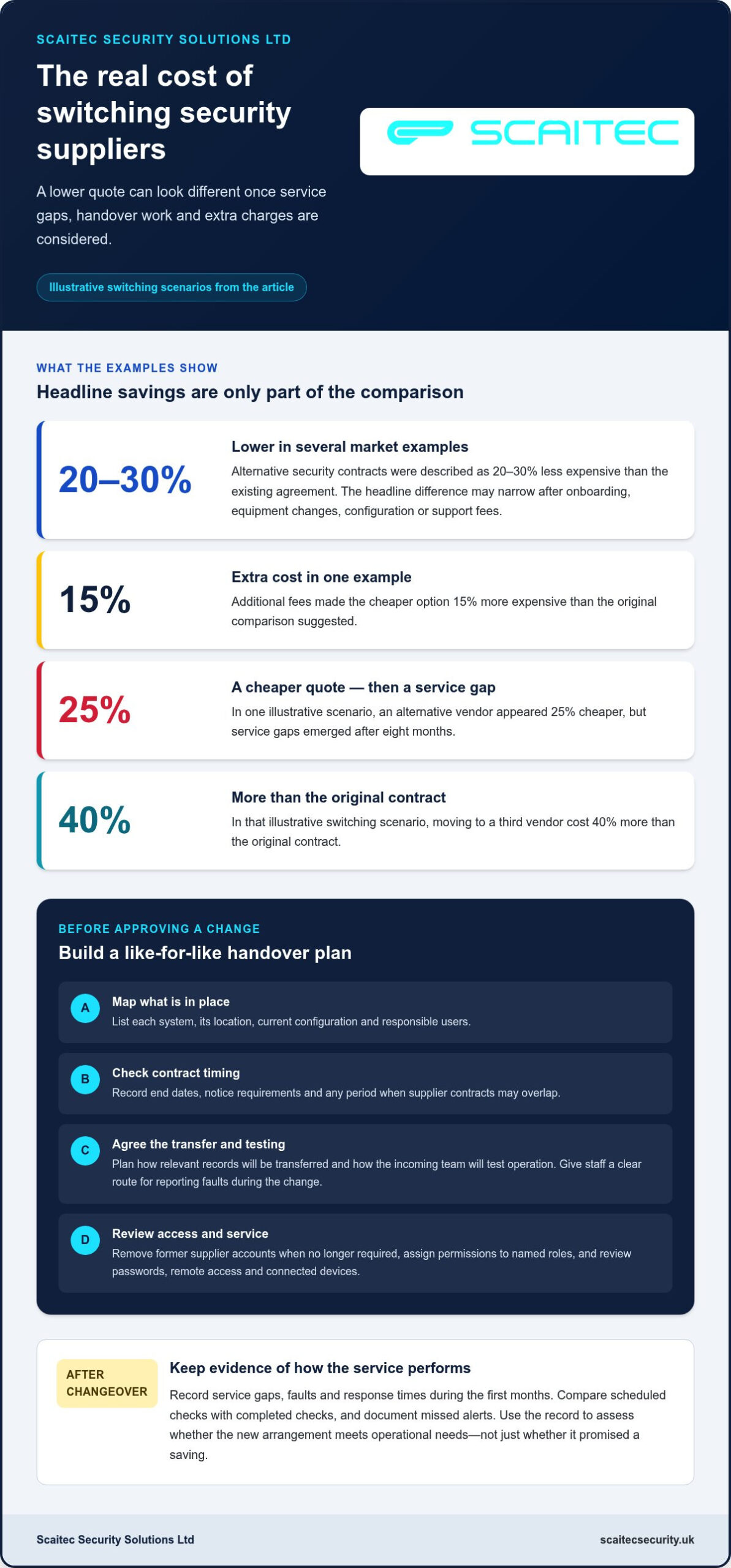
A lower quote can prompt a change, but repeated transitions add work beyond the contract price. In one illustrative scenario, an alternative vendor appeared 25% cheaper, yet service gaps emerged after eight months. That gap can affect operational routines, particularly when staff rely on consistent monitoring and detection. Before switching, compare the service each proposal actually delivers, not just the headline saving.
Several market examples describe alternative security contracts as 20–30% less expensive than the existing agreement. That apparent difference may narrow when a new supplier charges for onboarding, equipment changes, configuration or support. Additional fees in one example made the cheaper option 15% more expensive than the original comparison suggested. Build a like-for-like schedule of included tasks and exclusions before approving a change.
Repeated changes can compound the disruption. In the illustrative switching scenario, moving to a third vendor cost 40% more than the original contract. Each handover can require fresh site information, access permissions, system configuration and staff instructions. If those steps are rushed, an alarm or camera may not connect as expected, leaving teams with uncertainty about detection and response.
Plan the transition in stages. First, list each system, its location, current configuration and responsible users. Next, record contract end dates, notice requirements and any overlap between suppliers. Then agree how the outgoing vendor will transfer relevant records and how the incoming team will test operation. A written handover plan gives staff a clear route for reporting faults during the change.
Cybersecurity also needs attention during a supplier handover. Remove former supplier accounts when their access is no longer required, and assign permissions to named roles. Review passwords, remote access and connected devices as part of the changeover. These steps reduce avoidable exposure, including the risk of an old account remaining active after responsibilities have moved.
Keep a record of service gaps, faults and response times during the first months after a system change. For example, compare scheduled checks with completed checks and document any missed alerts. This creates evidence for deciding whether the new arrangement meets operational needs, rather than relying on a promised saving alone. Use the same measures if you consider another change.
For a business site, map how security systems support staff, premises and daily operations before changing suppliers. A structured business security approach can help organise those requirements and make transition planning more coherent. Treat continuity, access and testing as part of the decision, alongside contract cost.
3. Long-term costs and insurance premiums
A low purchase price matters less if the system needs repeated attention or early replacement. To assess long-term value, compare expected maintenance, software renewals, technical support and hardware changes across the period you plan to use the equipment. Include staff time too: an employee who regularly resets unreliable equipment is absorbing an operational cost, even if no repair invoice arrives.
Build a simple ownership schedule before choosing a system. Record each recurring charge, its renewal date, what it covers and who uses it. Separate routine servicing from repairs, software subscriptions and replacement parts. Then note which costs could change as your site, staffing or security requirements change. This makes it easier to compare options on the same basis instead of judging them by their initial price.
Insurance premiums need separate attention. Security measures such as alarms and cameras can influence an insurer’s assessment, but fitting equipment does not automatically reduce your premium. The effect depends on the insurer’s terms, the property and the cover selected. Ask your insurer how a proposed measure affects its assessment, and record the answer alongside your policy details.
At renewal, review the policy wording and any requirements linked to security equipment. Check whether cover depends on the system being maintained, operational or used in a particular way. For example, a camera that no longer records properly may not provide the evidence your business expects after an incident. Keep service records and document faults, repairs and equipment changes.
Also compare your insurance cover with the support you already pay for. Organisations should check whether cyber insurance includes remediation costs, so they do not pay twice for services already covered by the policy. Separate physical security equipment from cyber cover in your cost review, then identify overlapping support, exclusions and responsibilities before renewing either arrangement.
Software costs can rise as a system’s users and needs change. A new employee, additional access permissions or expanded storage may affect subscription charges, depending on the provider’s pricing model. Before enabling a feature, identify its cost basis and who approves the change. Review active users and features regularly, and remove access that is no longer needed.
Finally, assess the value of each security measure against the risk it addresses. List the asset, the likely consequence of a failure and the protection the system provides. Then prioritise upkeep that keeps essential functions working instead of paying for features nobody uses. This gives you a clearer view of long-term costs, insurance considerations and practical protection together.
4. Maintenance and replacement of cards and hardware
A security system’s useful life depends on more than whether it still switches on. A reader may fail to recognise a card, a camera may produce unclear footage, or a control panel may stop communicating reliably. Track faults, repairs and replaced parts in one maintenance log. That record helps distinguish an isolated failure from a recurring weakness.
Access credentials need active management as staff and roles change. Record who receives each card or fob, when it is returned and whether access is removed. For example, a lost card should prompt a review of its permissions, not just a replacement order. Forgotten credentials can remain a security vulnerability if nobody updates the system.
Replacement costs can arrive sooner than expected. Some manufacturers discontinue support for older models, which can make repairs or compatible parts harder to obtain. Check the model and its support status during a system review. If a key component is nearing the end of support, plan a staged replacement rather than waiting for a breakdown.
AIT Worldwide Logistics said it needed to replace its CCTV network 18 months before its statement. That example shows why replacement planning belongs in long-term budgeting. List each device, its condition, support status and role in site security. Prioritise equipment whose failure would interrupt essential coverage, then schedule upgrades around operational needs.
Routine maintenance can reveal deteriorating hardware before it fails. Include checks of camera images, connections, access readers, alarms and backup arrangements in the service record. Note the fault, action taken and any follow-up required. Comparing those entries over time helps identify repeat repairs that may cost more in effort than a planned replacement.
Cheap equipment may appear to save money at purchase, yet repeated faults can absorb staff time and weaken security coverage. A camera that stops recording during an incident may leave a business without useful footage, affecting investigations and reputation. Review whether each repair restores dependable operation or only delays a better equipment decision.
Set a replacement plan based on condition, support availability, repair history and the impact of failure. Keep spare credentials controlled, and document who can issue or cancel them. Include software compatibility in hardware reviews, since a new component must work with the existing system. These practical steps make maintenance decisions easier to explain and budget for.
Planned security system maintenance can help identify faults and ageing components before they disrupt operation. Use the findings to prioritise essential repairs, record completed work and review replacement needs. A clear service history turns upkeep from an unexpected response into a managed part of protecting the site.
5. Professional installation and system setup
A security system can be inexpensive to buy yet costly to make effective if installation overlooks the site’s actual risks. Professional setup begins with a survey of entrances, valuables, working patterns and existing equipment. Those details guide camera positions, alarm coverage and access permissions. Without that planning, a camera may miss a doorway or a sensor may overlook a route into the building.
Consider a small business with a front entrance, rear delivery door and internal stockroom. A useful design must account for each area, how staff move between them and what should trigger an alert. The installer can then position equipment, plan cabling and configure the system around how the site is used. This reduces avoidable changes after installation, such as relocating a camera or adding a sensor.
Configuration matters as much as physical placement. Set clear user permissions, name devices consistently and define how alerts should reach responsible people. For example, an alarm event should identify the relevant zone rather than leave staff guessing which area needs attention. A documented setup also helps future technicians understand the system and carry out maintenance efficiently.
Integration needs deliberate testing. If cameras, alarms and access controls operate separately, staff may need to check several interfaces to understand one event. Test each device, user permission and alert pathway during commissioning. Record the result, correct faults and show designated users how to operate the system. This practical handover can prevent confusion during routine use or an incident.
Training is another practical part of installation. Staff should know how to arm and disarm the system, respond to alerts and report a fault. A simple written guide can cover normal opening and closing routines, as well as who has authority to change access. Without these procedures, incorrect use may lead to repeated call-outs or leave security measures inactive when they are needed.
There is no single typical amount that installation, setup and maintenance add to a cheap alarm system. The price depends on the property layout, equipment, cabling, configuration and maintenance scope, and is provided after a quote request.
To compare proposals, ask for a clear breakdown of equipment, installation work, system configuration, testing, user instruction and ongoing maintenance. Check that the scope describes the areas being protected and the setup tasks involved. A lower initial figure may not include every step needed for a working system, making the comparison incomplete.
Before approving work, prepare a site plan and list the outcomes each security measure must support. Use that list during the installation review, then keep the final device locations and operating instructions with your maintenance records. This gives future staff and technicians a practical reference when the premises or system changes.
Scaitec Security Solutions: CCTV Systems
Scaitec Security Solutions Ltd can help when you need security equipment designed, installed and maintained as a complete system, rather than chosen on purchase price alone. Its CCTV Systems can be planned alongside Intruder Alarms, Access Control systems or Fire Alarm installations that meet current British Standards, according to your site’s requirements.
For a home or business reviewing existing equipment, start by identifying what needs protection, how people use the premises and where current coverage falls short. This gives you a clearer basis for discussing installation and ongoing system maintenance, without assuming every component needs replacing at once.
Contact Scaitec Security Solutions Ltd to discuss your security requirements, or visit scaitecsecurity.uk.
Make your next security decision with confidence
Use the hidden costs of cheap security systems as a prompt to look beyond the first quote. Before making your next decision, write down what the site needs to protect, how staff use the space and what a successful installation must enable. This gives you a practical basis for discussing system design, setup and future upkeep.
Scaitec Security Solutions Ltd can help you consider CCTV Systems, Intruder Alarms and Access Control systems in relation to your property and security requirements. A clear discussion of your priorities can shape a solution around the site, rather than adding equipment without a defined purpose.
A considered plan is a strong place to begin. Take the next step at your own pace, with your priorities clearly in view.
Frequently Asked Questions
How Do You Calculate the True Return on a Security Investment?
Compare the system’s full ownership cost with the expected reduction in losses and disruption. One useful risk measure is annualised loss expectancy: multiply the estimated loss from an incident by its annual probability. For example, assess a stockroom break-in separately from an access-control failure, then weigh each against installation, upkeep and staff time. This makes the assumptions behind your investment decision visible and easier to review.
What Are the Hidden Costs of Cheap Security?
Costs can include labour spent resolving faults, extra configuration, replacement parts and charges for ending a service. Check actual invoices and internal records, not just the original proposal. For example, if a site manager repeatedly resets a camera system, record that time alongside repair visits. The hidden costs of cheap security systems become clearer when you assign each expense to a device, task or contract.
What Steps Should You Take to Choose the Right Security Solution?
Start by listing the assets, people and areas that need protection, then describe the outcome each measure should support. Compare proposals against those requirements, including equipment, setup, support and ongoing responsibilities. Ask for a demonstration or a practical handover plan so staff understand normal operation. For a South Yorkshire site, consider how the system fits the property’s layout and daily working routines.
What should you ask a vendor about hidden costs before switching?
Ask for a written breakdown of charges beyond any recurring contract, including onboarding, configuration, equipment changes, support and exit arrangements. Clarify which tasks are excluded, how renewals are calculated and whether added users or features change the bill. Request a transition plan covering records, account access and testing. Those answers help you compare the existing agreement with a replacement on consistent terms.
What’s the cost of a “good enough” security vendor with a higher false-positive rate?
The cost comes from alert handling as well as the contract. One market example of a budget-friendly security operations centre recorded three times more false positives than its incumbent provider. That is not a universal forecast for every system, but it shows why buyers should consider how staff will triage alerts. Include investigation time, interruptions and the risk of genuine warnings receiving less attention.
What’s the most expensive outcome when evaluating cheaper security vendors?
A serious breach or interruption can outweigh an apparent saving, especially if essential operations stop. Use this as a prompt to identify which activities depend on secure, available systems, rather than as a forecast for your organisation. Consider lost work, recovery effort and customer confidence when assessing exposure.
Why Does Cheap Security Seem Like a Smart Choice?
The initial quote is easy to compare, while future labour, servicing and disruption are less visible. A buyer may see a lower equipment charge and overlook the work needed to configure it, maintain it and support staff. For example, a system that requires frequent manual checks can transfer effort to employees. Comparing the whole operating arrangement gives the upfront saving more meaningful context.
What are the monthly monitoring and subscription fees for budget security systems in the UK?
Monthly charges reflect what is connected and included, such as monitoring, system scope, software and support. Scaitec Security Solutions Ltd provides Remote Monitoring 24/7; the price depends on the requirements and is given after a quote request. For a property in Rotherham or Sheffield, consider which alarms need monitoring and what continuing support your system requires before assessing the recurring charge.
Protect Your Business
Protect Your People
Book Your FREE Site Protection Survey

Since pioneering Scaitec Security Solutions in 2005, Paul Scaife, with his roots in the industry dating back to 1994, has distinguished the firm as a leading provider of bespoke fire and security solutions, servicing clients across Sheffield, Rotherham, and surrounding areas.
His leadership, underpinned by accreditation from the Security Systems and Alarms Inspection Board, ensures that Scaitec surpasses client expectations by blending advanced technology with a deep understanding of their unique needs.
Paul's ethos champions innovation and efficiency, driving Scaitec to deliver tailored, cutting-edge solutions that enhance safety and operational ease.
Discover more about Paul’s commitment to excellence on LinkedIn.