
Table of Contents
A security system is future-ready when it can adapt as your business changes. Future-proofing your business security system means planning and reviewing it over time, rather than treating security as a fixed installation. The goal is to keep protection aligned with how your organisation operates and make informed decisions as priorities, sites and technology evolve.
It is reasonable to expect security to keep pace with technology and day-to-day operations without adding unnecessary complexity. Start by considering what the business may need next, then assess whether current systems and procedures can support those plans. This makes decisions more deliberate and helps you see how equipment and working practices fit together.
Brought to you by Scaitec Security Solutions Ltd, this article explains how to plan for operational change, manage systems across sites and assess equipment performance. It also covers cloud-based options and ways to coordinate CCTV, access control and fire safety. Use the questions and practical steps below to review your security and identify which changes deserve attention as your organisation develops optimisation.
Key Takeaways
- Plan security around likely changes to sites, staffing and working hours so the system can grow with your operations.
- Consider how remote monitoring and centralised management could help oversee security across different locations.
- Review equipment and software performance regularly, looking for recurring faults, compatibility issues and signs that technology is ageing.
- Weigh the flexibility of cloud-based software against your operational needs and the hardware it may replace.
- Map how CCTV, access control and fire safety can work together to support everyday procedures and emergency responses.
1. Planning for expansion and changing operations
Start future-proofing with a clear view of how the organisation may change. Record plans for new sites, staffing, work patterns and opening hours, then compare them with current security coverage. A new warehouse, for example, may need access control at additional entrances. Longer operating hours may change who needs access and when. Reviewing these needs early makes it easier to plan for expansion.
Next, build a technology plan around business goals. List the operational changes security must support, then identify the systems, dependencies and people involved. Consider scalability, compatibility with existing equipment, and the resources needed for installation and maintenance. For a multi-site organisation, a consistent framework can simplify oversight and compliance management. Record decisions so future teams understand why systems were configured in a particular way.
There is no single UK upgrade cost: the price depends on the case and is given after a quote request, with factors including premises, existing equipment, coverage, integration and installation requirements.
Include Enterprise Resource Planning (ERP) environments in the security review. ERP platforms can bring sensitive business information together, so map which roles need access to each function and limit permissions accordingly. Staff who process orders, for example, may not need access to payroll records. Review how information moves between connected systems, and assign responsibility for updating access when people change roles.
Resilience planning should connect security decisions with the organisation’s wider technology strategy. Involve operational staff, managers and IT professionals: staff can identify daily access problems, while managers can explain expansion priorities. Turn those findings into a schedule that ranks work by operational impact. The UK Government says the Cyber Security and Resilience Bill will allow NIS regulators to designate critical suppliers, subjecting the most important suppliers to essential and digital services to mandatory cyber requirements. Businesses can account for relevant supplier dependencies in their planning.
Plan maintenance and upgrades alongside expansion, rather than treating them as separate tasks. Keep an inventory of security equipment, software, support arrangements and recurring faults. Use it to identify components that may need servicing or replacement before adding sites. If an existing system cannot support a planned location, compare options for extending or upgrading it before setting the project schedule.
For a practical starting point, group requirements by site, function and planned change, then review them against existing protection. Businesses assessing business security systems can use that structured review to clarify how CCTV, access control and fire safety fit their operational plans. Revisit the plan when premises, staffing or processes change, so security decisions continue to reflect the way the organisation works.
2. Remote monitoring and centralised management
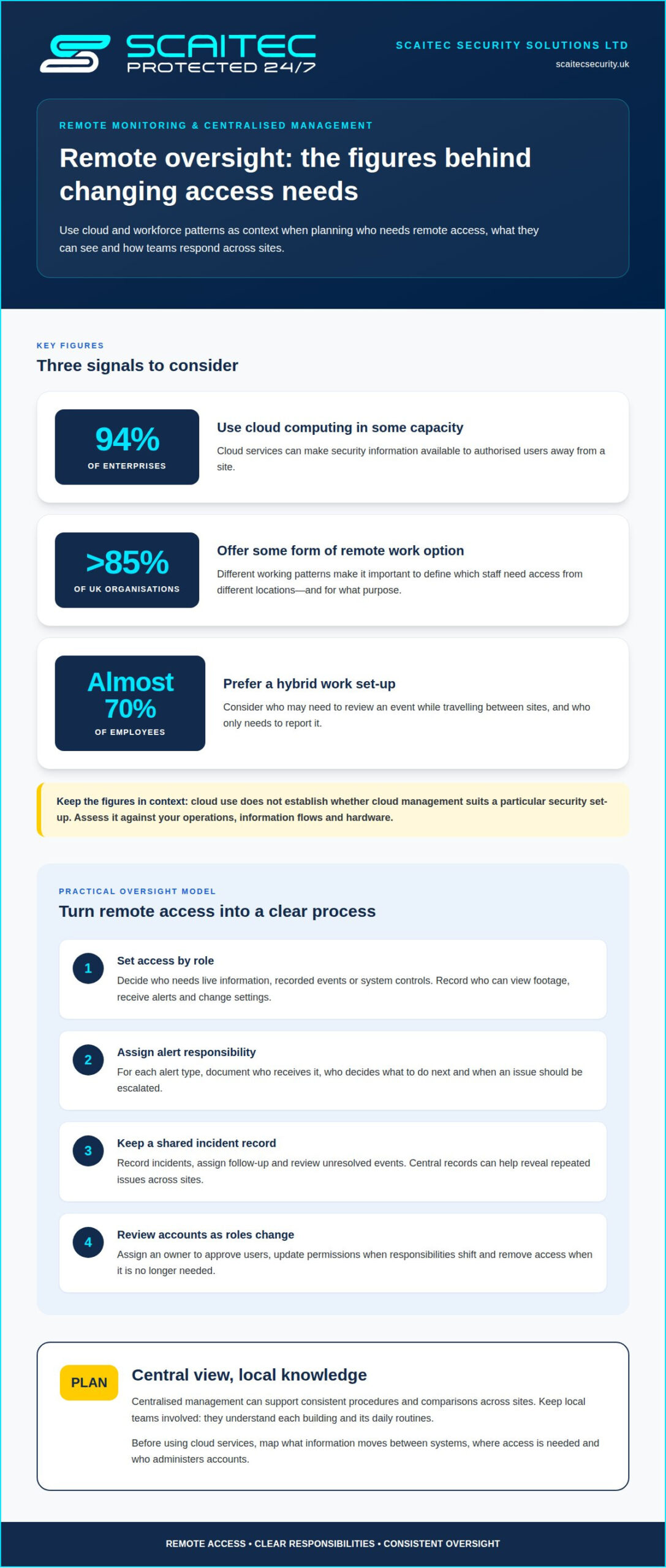
Remote oversight can help authorised teams manage security events across sites without being at each building. First decide which roles need access to live information, recorded events or system controls. Then define who receives alerts, who decides what action to take and how outcomes are recorded. A facilities team might review a shared dashboard, while site managers follow local procedures for incidents that need immediate attention.
Cloud services can make security information available to authorised users away from a site. 94% of enterprises use cloud computing in some capacity, although that figure does not establish whether cloud management suits a particular security setup. Before implementing it, map which information moves between systems, where access is needed and who administers accounts. This helps teams identify operational dependencies and understand how remote viewing fits existing responsibilities.
Remote and hybrid work make access arrangements more varied. More than 85% of UK organisations offer some form of remote work option, and almost 70% of employees prefer a hybrid work set-up. Use those patterns to define which staff need access from different locations and for what purpose. For example, a manager travelling between sites may need to review an event, while other employees only need to report it.
Alerts are useful only when staff know how to respond. For each alert type, document the responsible role, the next action and when to escalate. An access event might require a manager to review a record, while another signal may call for staff to follow an emergency procedure. Clear instructions reduce uncertainty during busy shifts.
Centralised management can make it easier to compare activity across sites and apply consistent procedures. Set a process for recording incidents, assigning follow-up and reviewing unresolved events. If one site reports repeated access issues, a central record can reveal a pattern that separate local logs might hide. Keep local teams involved because they understand the building and its daily routines.
Remote access also requires routine account administration. Assign an owner to approve users, change permissions when responsibilities shift and remove access when it is no longer needed. Record who can view footage, receive alerts or change system settings. Review permissions when work patterns change instead of letting old access arrangements continue by default.
Test the process with a realistic scenario, such as an alert arriving while the usual manager is away. Confirm that the designated colleague can receive the information, understand the procedure and record the outcome. Repeat the review after staffing or technology changes. Include remote access arrangements in regular operational reviews as threats and cybersecurity needs evolve.
3. Assessing hardware and software performance
Start by checking whether each component performs its intended task. For a camera, assess whether it captures useful detail at the times and in the conditions the business needs. For an access point, check that authorised staff can enter smoothly and that permissions work as intended. Compare these observations with staff reports, fault records and operational demands, rather than judging equipment by age alone.
To check scalability and compatibility, compare current capacity with planned needs. Identify which devices, software functions and connections could be affected by adding users, sites or equipment. Test proposed technology with a representative component before wider adoption. A trial can show whether alerts, permissions and routine tasks continue to work with the existing setup, and reveal dependencies to resolve first.
Review the security architecture as a connected system. Map how equipment communicates, where information is processed and which interfaces link separate functions. Look for duplicated controls, unsupported connections and single points where a fault could disrupt several operations. For example, trace what staff can still do if a central workstation is unavailable. This helps distinguish a local device failure from a wider design issue.
Outdated components can create risk when manufacturer or software support ends, leaving them without updates or patches. Identify end-of-life items and prioritise replacement based on their role, support status and operational impact. Equipment protecting a critical entrance, for example, may need attention before a device serving a low-use area.
Regular IT assessments should examine configuration as well as day-to-day performance. Check that system clocks align, alerts reach the right destination and user accounts reflect current responsibilities. Review software compatibility after changes to connected technology. These checks can uncover practical faults, such as event records showing inconsistent times or notifications going to someone who has changed roles.
Vulnerability assessments can help identify weaknesses in system settings, connected components and working practices. Define the scope, record findings and assign an owner to each corrective action. A review might identify an unnecessary account or a connection that no longer serves a business purpose. Reassess after significant changes and confirm that corrective work has addressed the original finding.
Use a consistent test record to compare performance over time. Note the component tested, operating conditions, observed result and action taken. This gives decision-makers evidence when choosing between repair, replacement or a planned upgrade. It also helps explain a fault’s operational impact instead of relying on vague descriptions such as “unreliable”.
Connect assessment findings to business priorities. Rank proposed work by its effect on safety, continuity and staff productivity, then schedule upgrades to minimise disruption. If a change affects several systems, test the revised arrangement before relying on it during normal operations. This disciplined review helps maintain flexibility as technology and business requirements develop.
4. Cloud-based software and reduced hardware maintenance
Cloud-based software can help organisations expand security management without adding equivalent computing hardware on site. The cloud provider handles updates and upkeep for its servers and application software, reducing some maintenance tasks for internal teams. A business opening another office, for example, could extend its management arrangements without installing a separate server room there. Connectivity, permissions and operational requirements still need planning.
Cloud-based systems can offer flexibility as operational demands grow, while on-premises systems keep more infrastructure under the organisation’s direct control. Cloud services may reduce on-site hardware needs but depend on reliable internet access and the provider’s service. On-premises systems require equipment maintenance and planned upgrades, but may suit operations that need local control. The right choice depends on how the business works and manages these dependencies.
IP-based security infrastructure can make changes more modular. Devices can be added, replaced or upgraded without disrupting the entire installation, helping organisations respond to new coverage needs in stages. A business expanding into another area, for example, can assess whether compatible devices can join its existing setup instead of replacing everything. Check compatibility and capacity before adding equipment.
Scalable cloud platforms can help businesses expand capabilities without substantial upfront infrastructure, but scalability alone does not make a platform suitable. First map critical functions: which sites need access, what information users require and how the system should work if connectivity is interrupted. Compare those needs with platform capabilities, support arrangements and existing equipment. This ties technology choices to operations instead of adopting new technology for its own sake.
Before moving management functions to the cloud, map where system data travels and who can access it. Separate administrator permissions from everyday user access, and remove accounts when responsibilities change. Consider how staff will respond if a connection or service becomes unavailable. A written fallback procedure should identify who is responsible and how essential security tasks will continue during disruption.
For an on-premises setup, list servers and other supporting equipment, their maintenance needs and replacement considerations. For cloud services, document provider responsibilities, account administration and update arrangements. In either case, keep system records current when equipment or software changes. This gives operational teams a clear view of dependencies and helps them plan maintenance without overlooking connected components.
A phased approach can reduce disruption during change. First, choose a suitable function or location for a controlled implementation. Test access, connectivity and daily procedures, then resolve issues before extending the arrangement. Record what the trial reveals about workload, staff responsibilities and compatibility. These findings help determine whether cloud management, on-premises infrastructure or a combination best supports the organisation’s security needs.
5. Integrating CCTV, access control, and fire safety
The most adaptable approach coordinates CCTV, access control and fire safety around operational needs. No single technology suits every business, so compatibility and clear procedures matter. A site with restricted staff areas, for example, may need access permissions aligned with CCTV coverage and emergency arrangements. Plan how systems should share information before choosing what to integrate.
UK businesses should consider UK GDPR obligations when designing CCTV, access control and workplace monitoring systems. Start by defining why each system is used, who needs access to its information and how that information supports operations. Decide which roles need to review footage or access records, for example, and align permissions with those responsibilities.
Integration is useful when an event needs a coordinated response. CCTV can provide visual context after an alarm activation, while access control can be aligned with working schedules. Fire safety systems can support emergency procedures by helping staff understand what to do when an alarm sounds. Map each event to the action, role and communication route that should follow.
Build an event-and-response map before connecting systems. List routine events, such as a staff member entering a restricted area, alongside urgent events, such as a fire alarm activation. For each event, record what information should be available, who responds and which procedure applies. This can reveal gaps beyond the technology, including unclear responsibilities or conflicting team practices.
Test integrated processes using realistic site scenarios. For example, check whether staff can follow the evacuation procedure when an access-controlled door is involved. Confirm that CCTV coverage supports its intended purpose, without treating cameras as a substitute for staff instructions. Record process or configuration changes, then update guidance so staff can follow consistent procedures.
For future changes, prioritise systems that work with existing equipment and support staged upgrades. Document connections, responsibilities and the intended response to each event. When a business adds a site or changes its working arrangements, revisit that map before making changes. This keeps security decisions tied to real practices instead of adding technology without a defined purpose.
Integrating CCTV with business access control can help align entry management with wider security procedures.
Plan integrated access control
CCTV, access control and fire safety systems are a strong fit when they work with existing equipment and support staged upgrades. Choose and integrate them according to operational needs, clear responsibilities and coordinated responses to events.
Scaitec Security Solutions: CCTV Systems
Scaitec Security Solutions can help businesses plan electronic security as sites, staffing and operational needs change. Its CCTV installation and maintenance can be considered alongside Access Control, Intruder Alarms and Fire Alarm installation and maintenance, helping businesses plan coverage around their premises and procedures.
Turn to Scaitec when reviewing an existing installation, planning site changes or considering how security systems could work together. System Maintenance supports ongoing upkeep as equipment and operational requirements evolve. A review of your premises, current systems and intended changes can help identify the next practical step.
Contact Scaitec Security Solutions or visit scaitecsecurity.uk to discuss your requirements.
Make your next security decision part of the plan
Future-proofing your business security system is an ongoing management decision, not a one-off installation. As operations change, use each planned move, new process or equipment review to consider whether security still supports the way people work. A clear record of priorities and responsibilities helps keep future decisions connected to business needs.
Choose one upcoming operational change to guide your next review. Identify what it means for site coverage, access and the systems staff rely on. Then agree which improvements are relevant and how you will assess whether they work. This gives your team a practical starting point without trying to change everything at once.
Scaitec Security Solutions offers CCTV, Intruder Alarms and Access Control. These services can help you review how monitoring and controlled entry support your premises as operations develop.
With a considered next step, you can shape security around the business you are building and adapt more confidently as it changes.
Frequently Asked Questions
What is future-proofing and why is it so important?
Future-proofing means making decisions that help systems stay useful as an organisation’s needs and technology change. It matters because security arrangements can become mismatched when a business changes its premises, processes or staffing. A new delivery procedure, for example, may create access needs that an older setup never accounted for. Planning ahead helps teams make considered updates instead of reacting only after a problem appears.
What practices should companies adopt to prepare for the future?
Connect security decisions to business plans, assign owners for follow-up actions and keep clear records of system changes. For example, add a security review to planning for a new site or shift pattern. Staff who use systems every day can identify access or workflow issues, while managers set priorities. Considering both perspectives turns operational needs into practical improvements.
What does future-proofing a business security system involve?
Understand what the system protects, how teams use it and what changes could affect its role. Keep an accurate record of equipment, software, access permissions and dependencies. Note, for instance, which business process relies on a particular entry point or alert. This context helps decision-makers assess proposed changes, retain useful components and identify upgrades that could support future operations.
How can businesses integrate CCTV, alarms, access control and cybersecurity systems?
Begin by defining the response each system should support, such as reviewing an alarm event alongside relevant camera footage. Set clear permissions for staff who may view recordings or manage access. Assign responsibility for cybersecurity controls that protect networks and accounts supporting connected equipment. Treat physical security and cybersecurity as coordinated but distinct areas, and document how incidents move between their procedures.
What steps should a business take to assess and upgrade its security system?
Appoint an owner to coordinate the review, gather system records and ask staff to report operational problems. Prioritise findings by their effect on safety, access and business continuity. Before wider changes, trial a proposed adjustment in a suitable area and record whether staff can use it correctly. Document the final configuration and responsibilities so future maintenance or handovers do not depend on informal knowledge.
How often should a business review its security system and plan for upgrades?
Set a regular review schedule that reflects the system’s role, maintenance needs and pace of business change. Review sooner after a move, refurbishment, change in working hours, recurring fault or new operational process. Check whether equipment still serves its intended purpose, permissions remain appropriate and planned upgrades are recorded. This ties reviews to meaningful triggers, not just the passage of time.
Protect Your Business
Protect Your People
Book Your FREE Site Protection Survey

Since pioneering Scaitec Security Solutions in 2005, Paul Scaife, with his roots in the industry dating back to 1994, has distinguished the firm as a leading provider of bespoke fire and security solutions, servicing clients across Sheffield, Rotherham, and surrounding areas.
His leadership, underpinned by accreditation from the Security Systems and Alarms Inspection Board, ensures that Scaitec surpasses client expectations by blending advanced technology with a deep understanding of their unique needs.
Paul's ethos champions innovation and efficiency, driving Scaitec to deliver tailored, cutting-edge solutions that enhance safety and operational ease.
Discover more about Paul’s commitment to excellence on LinkedIn.