
Table of Contents
A red light on a fire panel is a signal to take seriously, not a diagnosis to guess. If you’re asking “what does a red light on a fire panel mean”, the answer depends on the panel’s display, the sounders and what’s happening in the building. In most cases, a red alarm indicator means the system has detected a possible fire, so treat it as real and follow the site’s evacuation procedure.
It’s understandable to feel unsure when lights, zone numbers or messages are unfamiliar, especially if you’re worried about silencing or resetting the system. Don’t silence or reset the panel to investigate. If the alarm is sounding, leave by the nearest safe exit, go to the assembly point and call 999 if there may be a fire. Don’t re-enter until it’s confirmed safe.
This guide explains how to interpret the panel’s indications, what to do in an alarm or fault situation, and why the exact model and displayed message matter. You’ll also learn when a competent fire alarm professional should investigate and how planned maintenance can help keep the system dependable.
Key Takeaways
- To understand what does a red light on a fire panel mean, check the indicator label and screen message alongside the panel make and model.
- A zone reference helps identify the area involved, but it doesn’t by itself confirm the cause or exact device.
- Alarm, fault and disablement indications can point to different issues; if fire is suspected, treat the situation as an emergency.
- Note the panel’s message and behaviour, then arrange competent support for a repeated, unexplained or persistent indication.
- Keeping records of alarm events, tests and remedial work in the premises logbook helps support effective system maintenance.
What does a red light on a fire panel usually mean?
If you’re looking at a red indicator, it’s reasonable to wonder whether the building is at risk. In many fire alarm systems, red is associated with an alarm condition, but colour alone can’t confirm what has triggered the panel. The answer to “what does a red light on a fire panel mean” depends on the panel’s make and model, the indicator label, any screen message and whether the light is steady or flashing.
If the alarm is sounding or there are signs of fire, treat the situation as an emergency and follow the site’s evacuation procedure. Don’t assume a signal is harmless simply because you suspect a fault or unwanted activation.
Why a red indicator is not a universal diagnosis
Manufacturers and system configurations can use lights in different ways. A red light labelled “Fire” or “Alarm” may indicate an alarm state, while another red indicator could relate to a different status on a particular panel. Fault, disablement and power-status indications may also be shown with different colours or messages, so there’s no reliable colour code that applies to every system.
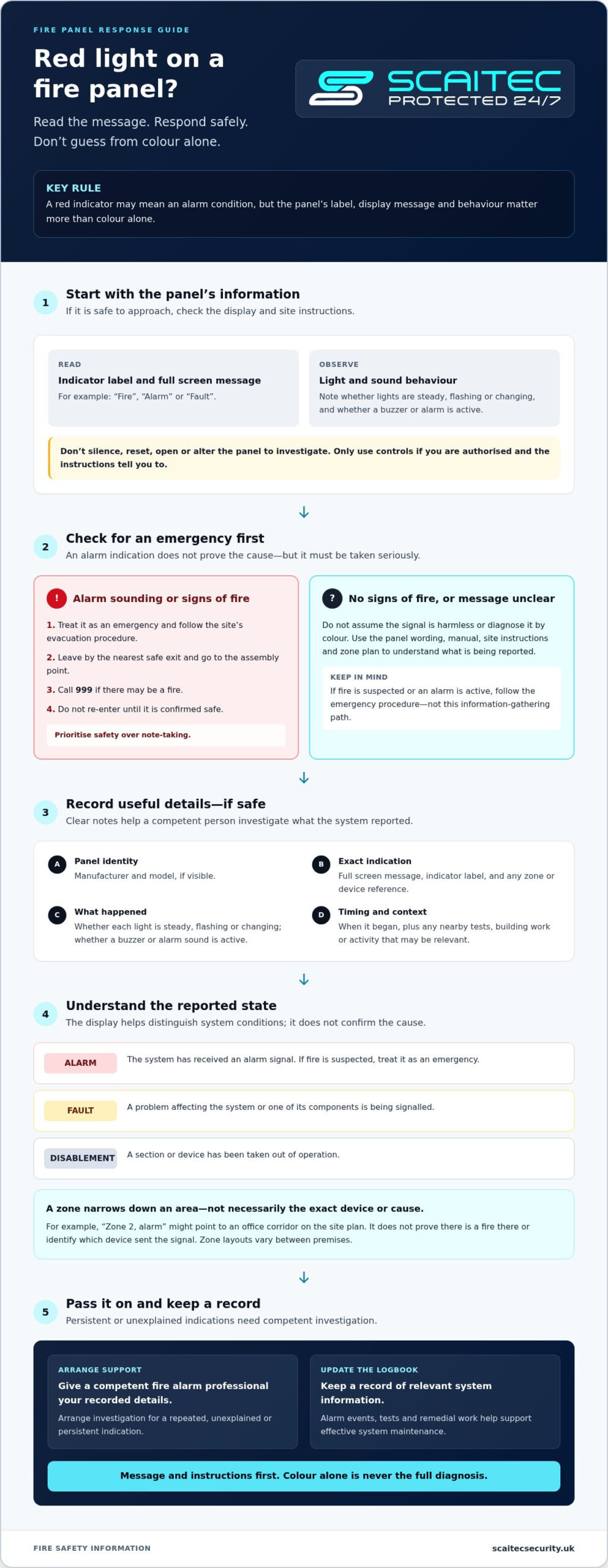
Read the wording beside the indicator and on the screen. Note whether the light is steady or flashing, and record any sound or other visible change. The panel manual and displayed text take precedence over colour alone.
What the fire alarm control panel is reporting
The fire alarm control panel is the system’s interface: it shows the system’s status and reports events detected by connected devices. For a basic overview of its role and functions, see this guide to the Fire alarm control panel.
A message such as “Alarm”, “Fire” or “Fault” can help distinguish the type of condition being reported. A zone label or device description may narrow down the area, for example, “Zone 2” or a named corridor. However, a zone identifies where the system has registered a signal, not necessarily the precise detector or the cause. Check the exact wording rather than treating a location reference as proof of what happened.
A fire alarm control panel is different from an intruder alarm control unit, which manages a separate security system. Scaitec also provides intruder alarm systems. For information about fire alarm systems and safety support, see our fire safety page.
How to read the fire panel display, zones and other indicators
Once you’ve checked the panel’s message, look at the whole set of information rather than interpreting one light in isolation. If it’s safe to approach, use the site’s panel instructions and zone plan to understand the wording. The logbook may also record recent tests, alarms or work that helps explain a change in status. Don’t open the panel or press controls unless you’re authorised and the instructions tell you to do so.
Which details should you note before seeking help?
Accurate details help the person investigating understand what the system reported, without relying on a description such as “the red light is on”. Record:
- The panel manufacturer and model, if visible.
- The full screen message, indicator label and any zone or device reference.
- Whether each light is steady, flashing or changing, and whether a buzzer or alarm sound is active.
- When the indication began, plus any nearby alarm tests, building works or activity that may be relevant.
Don’t silence, reset or alter the panel just to gather information. If there are signs of fire or an active alarm, prioritise the site’s emergency procedure over note-taking.
Can a zone indicator identify the source?
A zone is an area or circuit grouping set up for that particular premises. It can help narrow down where the system registered an event, but it doesn’t necessarily name the exact detector or explain why it activated. The zone plan should show how the building’s zones are arranged, and a competent investigation may still be needed to identify the specific device or cause.
For example, an illustrative panel might display “Zone 2, alarm” while the site plan labels Zone 2 as an office corridor. That points towards an area to investigate; it doesn’t prove there is a fire in the corridor or identify which device sent the signal. Zone layouts and display details vary between systems.
It also helps to distinguish the reported states. An alarm indicates an alarm condition; a fault signals a problem affecting the system or one of its components; and a disablement means a section or device has been taken out of operation. The display wording and site instructions matter more than assuming a particular colour always means the same thing.
If the message remains unclear or points to a persistent fault, keep your notes with the premises logbook and arrange competent investigation. Scaitec provides corrective fire system support to help identify and address system issues.
Red fire indication, fault or false alarm: how to tell the difference
A fire indication, a fault and a disablement describe different system states, but the precise wording and behaviour depend on the panel. A fire indication means the system has received an alarm signal. A fault suggests an issue affecting the system or one of its components, whilst a disablement means a part of the system has been taken out of operation. None should be diagnosed by colour alone.
An indication describes system status; it does not, by itself, verify the cause. Dust, device damage, environmental conditions or maintenance issues may contribute to an unwanted activation, but the same display could also report a genuine fire. Only the panel documentation and a competent investigation can establish the cause. If you’re wondering what does a red light on a fire panel mean, consider the full message and the circumstances, not just the indicator.
What if the panel shows a fire indication but you see no smoke?
Follow the premises’ fire action plan and treat uncertainty cautiously. Smoke may not be visible from where you are, and the indicated zone might not immediately reveal the exact device or source. Raise the alarm and evacuate as directed by the site procedure. Don’t silence, isolate or reset the system to investigate, and don’t re-enter until it’s confirmed safe.
What if the panel shows fault or disablement?
A fault or disablement may mean that some part of the system is impaired, although the implications depend on the panel and what is affected. Note the exact message and any zone or device reference, then inform the responsible site contact or facilities lead. Don’t assume the rest of the system is unaffected. A persistent condition, or one affecting protection, needs competent assessment.
Use the display wording, system behaviour and site instructions to guide the next step:
- Fire or alarm indication: follow the fire action plan; if a fire is suspected, evacuate and call 999 when appropriate.
- Fault indication: report the displayed issue and arrange competent investigation.
- Disablement indication: tell the responsible site contact, as part of the system may not be operating as intended.
Don’t try to confirm an unwanted activation by operating controls or inspecting equipment yourself. Keep a record of what the panel showed and when it occurred. If a fault or unexplained indication persists, corrective fire alarm support can help identify and address the issue.
What should you do when a fire panel shows a red light?
If you’re unsure what does a red light on a fire panel mean, put people’s safety before trying to interpret or operate the controls. The steps below are general guidance. Your premises’ fire action plan and instructions for the specific panel should guide the response on site.
If there may be a fire or immediate danger
If the alarm is sounding, you can see smoke or fire, or there’s another sign of immediate danger, act without delay. Don’t wait to investigate the panel. Follow the premises’ evacuation plan and instructions from the person responsible for the site.
- 1. Raise the alarm if it hasn’t already sounded, following the site procedure.
- 2. Evacuate by the nearest safe designated exit. Don’t stop to collect belongings or use a lift.
- 3. Go to the assembly point and don’t re-enter until authorised.
- 4. Call 999 if there’s a fire or immediate danger, and share any relevant information safely.
Investigating the panel must never delay evacuation or an emergency call. Don’t return to the panel to silence the alarm while others are leaving.
If there’s no obvious sign of fire
No visible smoke doesn’t prove that an indication is harmless. Follow the site procedure, keep the situation under observation from a safe place, and don’t interfere with the controls. In particular, don’t silence, reset or isolate the panel unless you’re authorised and the site’s procedures and competent advice allow it.
Once it’s safe, pass the responsible person or facilities lead the exact message, zone or device reference, and whether the alarm is sounding or the indicator is changing. Record when it started and any relevant circumstances in the premises logbook. A zone reference can help direct an investigation, but it doesn’t establish the cause.
Arrange competent investigation if the indication remains unexplained or the panel reports a fault or disablement. These conditions may affect how the system operates, so don’t assume protection is unchanged. The panel’s documentation and the premises fire plan should inform the response; a competent professional can assess the system and advise on corrective action.
To ensure your system remains fully compliant and operational, arrange professional fire alarm support through Scaitec Security Solutions Ltd.
When to arrange fire alarm servicing or corrective support
A panel indication that clears and then returns, remains on display or can’t be understood from the site instructions needs attention. Record what happened and arrange competent investigation rather than repeatedly resetting the system. A fault or disabled section may affect the system’s reliability, so the responsible person should understand what is affected and what action is needed.
When does a panel indication need professional attention?
Seek competent fire alarm support for persistent, recurring or unexplained messages, including faults that reappear after a test or an alarm indication with no clear cause. Share the panel’s exact wording, any zone or device reference, when the event occurred and relevant logbook entries. This evidence can help focus the investigation, but it can’t establish the cause without assessment of the system.
If the panel indicates a fire, follow the premises’ fire action plan first. Maintenance or fault investigation is not a substitute for evacuation when there may be a fire. For an ongoing system issue once immediate safety procedures have been followed, fire alarm corrective maintenance can help identify and address the problem.
How routine servicing helps maintain system reliability
Planned servicing supports dependable operation by providing an organised opportunity to inspect and test the system, identify issues and record the work completed. Keep the premises logbook up to date with alarm events, tests, faults and remedial work. A clear history can help a competent person spot recurring problems and understand what has already been investigated.
For non-domestic premises, BS 5839-1:2025 is the current code of practice for fire detection and fire alarm systems, covering their design, installation, commissioning and maintenance. It came into effect on 30 April 2025, superseding the 2017 edition. This standard is technical guidance, not a substitute for advice on a particular premises or a legal assessment of its fire safety arrangements.
Scaitec provides planned fire system maintenance and corrective support in Rotherham and surrounding South Yorkshire. For broader local information about fire alarm systems, see the Rotherham fire alarm systems guide.
Keep your fire alarm system dependable
The answer to “what does a red light on a fire panel mean” depends on the panel’s message, indicator label and behaviour, so colour alone can’t confirm the cause. If a fire is possible, follow the premises’ fire action plan and prioritise evacuation. For an unclear, recurring or persistent indication, record the details and arrange competent investigation rather than silencing or resetting the system yourself.
Planned servicing and corrective support can help identify issues and maintain reliable fire alarm operation. Established in 2005, Scaitec provides fire alarm systems, maintenance and corrective support across Rotherham and wider South Yorkshire.
With clear records and the right professional support, you can respond to panel indications calmly and help keep your premises prepared.
Frequently Asked Questions
Does a red light on a fire alarm panel always mean there is a fire?
No, a red light doesn’t always confirm a fire. What does a red light on a fire panel mean depends on the panel’s make, model, indicator label and displayed message. It may show an alarm condition, but colour alone can’t establish the cause. If the alarm is sounding or fire is suspected, follow the premises’ fire action plan and treat it as an emergency.
Can a fire alarm panel show a red light when there is no fire?
Yes, a red light may appear without a fire, for example if the system has registered an unwanted activation or there’s an issue with a device. However, you can’t safely decide the cause from the light alone. Read the full panel message if safe, follow site procedures and arrange competent investigation if the indication is unexplained or returns.
What should I do if the fire panel red light is flashing?
Follow the premises’ fire action plan, particularly if the alarm is sounding or there are signs of fire. A flashing pattern can mean different things on different panels, so check the indicator label and display message only if it’s safe to do so. Don’t delay evacuation to investigate. Note the wording and report it to the responsible site contact once safe.
Can I reset a fire alarm panel with a red light?
Don’t reset the panel just to clear a red light. A reset may affect the system’s record of an event or leave the cause unresolved. Follow the site’s authorised procedures and the panel instructions, and only operate controls if you’re authorised and it’s appropriate after the situation has been assessed. If there may be a fire, evacuate first and call 999 when appropriate.
What does a red zone light mean on a fire panel?
A red zone light can indicate that the system has registered an event in the corresponding zone, but the exact meaning depends on the panel and its configuration. A zone usually refers to an area or circuit grouping, not necessarily one specific detector. Check the premises’ zone plan and the full display message. The reference can guide investigation, but doesn’t confirm the cause.
How do I know whether a fire panel is showing a fault or an alarm?
Read the exact screen wording and indicator labels rather than relying on colour alone. A message such as “Fire” or “Alarm” points to an alarm condition, whilst “Fault” indicates a reported system issue. The wording varies by panel, so consult its instructions and follow site procedures. If a fire is possible, treat it as an emergency even if you suspect a fault.
Who should I call if a fire alarm panel keeps showing a red light?
Tell the responsible person or facilities lead, then arrange assessment by a competent fire alarm professional if the indication persists or recurs. Call 999 if there’s a fire or immediate danger. Scaitec Security Solutions Ltd provides fire alarm maintenance and corrective support, serving Rotherham, Sheffield, Barnsley, Doncaster, Chesterfield, Worksop, Wakefield and Huddersfield. The company has been established since 2005.
Is it safe to silence a fire alarm panel if there is no smoke?
No, the absence of visible smoke doesn’t prove that the alarm is harmless. Don’t silence, reset or isolate the panel unless you’re authorised and the premises’ procedures and competent advice allow it. Follow the fire action plan and evacuate if the alarm is active or fire is suspected. Once safe, report the display message to the responsible site contact and arrange investigation if needed.
Protect Your Business
Protect Your People
Book Your FREE Site Protection Survey

Since pioneering Scaitec Security Solutions in 2005, Paul Scaife, with his roots in the industry dating back to 1994, has distinguished the firm as a leading provider of bespoke fire and security solutions, servicing clients across Sheffield, Rotherham, and surrounding areas.
His leadership, underpinned by accreditation from the Security Systems and Alarms Inspection Board, ensures that Scaitec surpasses client expectations by blending advanced technology with a deep understanding of their unique needs.
Paul's ethos champions innovation and efficiency, driving Scaitec to deliver tailored, cutting-edge solutions that enhance safety and operational ease.
Discover more about Paul’s commitment to excellence on LinkedIn.