
Table of Contents
A reliable security system for my home in Barnsley is more than a camera at the front door. It can combine an intruder alarm with door and window sensors, cameras covering entrances or vulnerable areas, and professional monitoring, which operates 24 hours a day, 7 days a week. The right setup depends on your home, the areas you want to protect and how you want alerts handled.
It’s understandable to weigh dependable protection against installation costs, ongoing monitoring fees and the commitment of a contract. This guide explains how home security systems work and compares wired and wireless options, battery and cellular backup, camera choices, monitoring and contract terms. You’ll be able to see which factors matter most for a Barnsley home and how to compare systems by their practical value, not just their equipment list.
Key Takeaways
- Compare professional monitoring with self-monitoring by considering who receives alerts and what happens when an alarm is triggered.
- Assess how battery and cellular backup could help keep a system connected during power or internet interruptions.
- Compare the full cost structure, including equipment, ongoing monitoring and any contract commitment, rather than focusing on one charge.
- Check how camera compatibility and video storage suit the entrances and areas you want to monitor.
- For a professionally designed camera setup, Scaitec Security Solutions provides CCTV Systems for homes.
What Are Home Security Systems?
For a Barnsley home, a security system can combine an alarm, sensors and CCTV. Compare how it is installed, how alerts are handled and what happens when the alarm is activated.
Professionally monitored systems
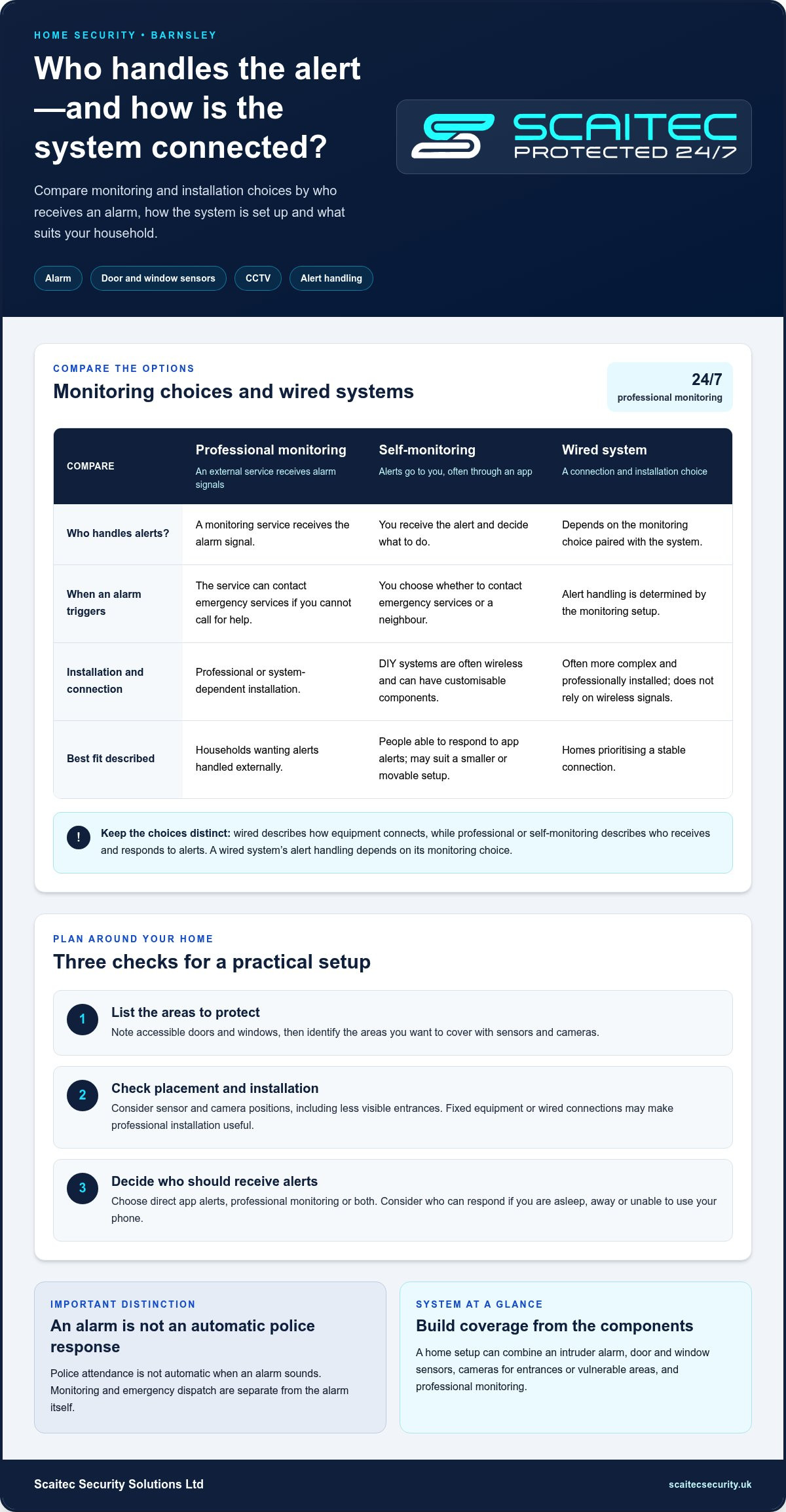
A professionally monitored system sends alarm signals to a monitoring service. Monitoring operates 24 hours a day, 7 days a week, and the service can contact emergency services if an alarm triggers and you cannot call for help. This differs from self-monitoring, where you receive alerts and decide what to do. Check how you disarm the alarm and what the monthly fee covers.
Self-monitored systems
With self-monitoring, an alert goes to you, often through a mobile app, rather than a professional monitoring service. You decide whether to contact emergency services or a neighbour. DIY systems are typically wireless and can have customisable components; that can suit a smaller home or a setup you may want to move. Consider who can respond if you’re asleep, away or unable to use your phone.
Professional installation
Professional installation can be useful when a system needs fixed equipment or wired connections. Wired systems do not rely on wireless signals, while wireless equipment may be simpler to install. A professional can assess sensor and camera positions, including less visible entrances, and help plan coverage around your property.
Are there police or council requirements for burglar alarms in Barnsley? Police attendance is not automatic when an alarm sounds. Monitoring and emergency dispatch are separate from the alarm itself, so understand how alerts are handled and keep the system maintained to reduce avoidable activations.
How can I check whether a security installer is approved by NSI or SSAIB? Search the NSI or SSAIB directories using the installer’s exact trading name. Match the listed business and approval scope to the work you need, such as intruder alarms.
Which home security companies serve Barnsley and have reliable customer reviews? Compare providers that state Barnsley coverage, then look for consistent comments about installation, communication and aftercare across independent review platforms. Recent, detailed feedback is more useful than a single rating.
What steps should I take to assess my home and choose an alarm system? List accessible doors and windows, identify areas you want to protect, and decide who should receive alerts. Match sensor and camera coverage to your property, then consider whether you want direct app alerts, professional monitoring or both.
Can a burglar alarm or CCTV system reduce home insurance premiums in the UK? Insurers set their own terms, so an alarm or CCTV may affect an assessment but doesn’t guarantee a lower premium. Keep details of your system available when discussing cover.
What Barnsley-specific crime data can help assess home security needs? Use the Police.uk crime map to compare recorded burglary patterns by neighbourhood rather than relying only on townwide totals. Consider how the pattern relates to your home’s entrances and the areas you want to protect.
| Option | Who handles alerts? | Installation | Best fit |
|---|---|---|---|
| Professional monitoring | Monitoring service | Professional or system-dependent | Households wanting alerts handled externally |
| Self-monitoring | Homeowner | Often DIY and wireless | People able to respond to app alerts |
| Wired system | Depends on monitoring choice | More complex, often professional | Homes prioritising a stable connection |
Choose by matching the system’s response, installation and coverage to your home and daily routine; if a property also contains a workplace, its requirements may differ, as outlined in business security systems.
Battery and cellular backup
A security system needs power and a way to send alerts. Battery backup and cellular backup address different interruptions, so assess them separately when choosing a reliable security system for my home in Barnsley.
Battery backup
Battery backup keeps compatible equipment powered if mains electricity fails. Cellular backup provides a communication route, not power. Check which components stay active, such as the alarm panel, sensors or cameras, and how the system reports a low battery. For example, the panel may keep running while a camera loses power.
Cellular backup
Cellular backup can provide another route for alerts if your home internet connection drops. It does not address a power cut. Wireless systems may rely on Wi-Fi, so an outage can affect remote access and app notifications. Check what remains connected and how the system signals a connection failure, especially if alerts usually arrive on your phone.
Treat power and communication as separate parts of the system. A power cut can affect equipment, while an internet outage can interrupt Wi-Fi-based communication. If both occur, one backup feature may not address both problems. List your alarm panel, cameras and sensors, then identify which need power and which must send an alert.
Homeowners should also consider what happens after an alarm is triggered. The system might sound locally, send an app notification or pass a signal to a monitoring service. Those actions depend on the equipment and its connection. A phone alert, for instance, may not help if you cannot receive or act on it.
What are common risks or drawbacks of wireless alarms, CCTV and smart security devices? Wireless devices may rely on Wi-Fi, so a dropped connection can affect remote access. Power interruptions, weak signal coverage and missed app notifications can also limit a device’s usefulness during an incident.
Environmental sensors add another consideration. Some systems monitor smoke and carbon monoxide as well as burglary, but each sensor has a distinct purpose. A temperature reading, for example, is not the same as smoke detection. Decide which events matter and how each sensor sends its alert, including whether that route depends on the internet.
Use this assessment to compare backup features for your home and choose a reliable security system for my home in Barnsley:
- Identify whether the alarm panel, cameras and sensors have battery backup.
- Check whether remote alerts depend on Wi-Fi or have cellular backup.
- Note how the system reports power loss, low battery or connection failure.
- Consider who can respond if an alert arrives while you’re away.
These checks help identify which interruption each backup feature addresses, so you can match the system to your home’s needs.
Equipment and monthly monitoring costs
Compare equipment and installation with any ongoing monitoring or maintenance, rather than judging a system by one charge. For a Barnsley household, the right setup depends on the property, the features you need and how you want alerts handled.
Paid monitoring plans
Professional monitoring connects alarm signals to a monitoring service. Before choosing a plan, compare what it covers and how alerts are handled. Equipment needs also depend on the property: a home with cameras and several sensors differs from one needing an alarm to cover a front door and ground-floor windows.
Separate one-off equipment and installation charges from recurring charges. The price depends on the case and is given after a quote request; equipment, installation, monitoring and contract terms affect the total. Check whether the monthly fee changes during the agreement, and what happens if you end the contract early.
Three-year monitoring costs
To compare plans over three years, multiply each monthly monitoring fee by 36, then add equipment and installation charges. This shows the ongoing cost separately from the initial setup. A plan with a lower monthly fee may still cost more overall if its equipment charge or contract terms differ.
Self-monitoring avoids a professional monitoring service, but equipment and internet costs may still apply. Compare the same features and period for each option, including any app or connected-device charges stated in the plan. This makes it easier to weigh professional monitoring against direct alerts.
Self-monitoring can suit homeowners who want smartphone alerts and can respond themselves. DIY systems generally don’t include professional monitoring, although many provide remote monitoring through an app. For example, an alert about a triggered sensor can reach your phone, but you decide whether to act. Check whether app access requires a subscription and whether the system needs an internet connection.
For a smart-home setup, list the features you need before comparing packages. Some systems let users control locks, lights and cameras through an app, but those devices may involve separate equipment and apps. Compare systems on the same basis: the devices included, how alerts are handled and any ongoing service terms.
| Cost item | Self-monitoring | Paid monitoring |
|---|---|---|
| Equipment | Include system components | Include system components |
| Monitoring | Compare any app charges | Include monthly fee |
| Three-year view | Add equipment and applicable charges | Multiply monthly fee by 36, then add setup |
Before choosing, write down equipment, installation, monthly monitoring and contract costs as separate lines. Then compare the full three-year total and decide whether professional monitoring or direct smartphone alerts better fit your household’s routine.
Camera compatibility and video storage
Camera choice affects what you can view, record and retrieve after an event. For a Barnsley home, compare compatibility with your alarm, connection, viewing method and storage arrangement before adding devices.
Start by mapping the areas you want to see. A camera facing the front entrance can show visitors approaching, while another may cover a side gate or driveway. Aim for useful detail without pointing unnecessarily towards neighbouring windows. Indoor cameras can cover hallways or other access routes, while outdoor cameras need a position suited to the entrance or boundary.
Compatibility means more than connecting a camera to the internet. Confirm that it works with the system’s app or recording equipment, and whether you can view it alongside other devices. A camera bought through Amazon, for example, may use a different app from an existing alarm. Check compatibility before purchase rather than assuming wireless devices will work together.
Live viewing and recording are separate functions. Live viewing lets you see a camera feed through an app; recording stores footage for later review. Storage may be local, such as on a recording device at home, or cloud-based. Check where recordings are kept, how you can access them and whether access depends on an internet connection. These details affect what you can review if an alert arrives while you are away.
Video doorbells combine a camera with the entrance bell, while outdoor cameras can cover other approaches. Neither replaces door and window sensors: cameras show visual activity, while sensors detect an opening. Pairing a camera view with an alarm can help you understand why it triggered, such as a visitor at the door or movement near a side entrance.
Before choosing cameras, write down the following for each location:
- View: entrance, driveway, side gate or hallway.
- Purpose: live viewing, recording, or both.
- Compatibility: app, alarm and recording equipment.
- Storage: local or cloud-based footage and how you retrieve it.
Recording settings affect how useful footage is. Check whether a camera records continuously or after an event, and how footage is organised for review. If an alarm is triggered at night, for instance, easy access to the relevant time period can make finding footage simpler. Lighting can improve visibility around an entrance, but camera position and field of view still matter.
Compare a video doorbell, an outdoor camera and an indoor camera by location and purpose, not appearance alone. Then match each camera to the viewing and recording setup you plan to use. This gives you a practical way to assess compatibility and storage before committing to a system.
Contract lengths and no-contract plans
A security system agreement affects ongoing services and what happens if you stop them. Compare the terms alongside app access, equipment and how the alarm fits your daily routine.
Some companies require a multiyear contract in exchange for a fixed monitoring fee and/or lower equipment fees. The initial equipment cost may therefore tell only part of the story. Read the agreement for its minimum term, renewal arrangements, cancellation process and any charges that apply when ending service. These terms determine how much flexibility you have if you move or change your security setup.
A service without a long-term monitoring commitment does not necessarily mean every feature is free. Separate equipment from any app or monitoring charges, and check which devices remain usable if you stop a subscription. For instance, a sensor may still trigger a local alarm, while remote alerts or recorded footage may depend on a connected service.
App control can add convenience where the system supports it. Some systems let users control locks, lights and cameras through a smartphone app. Depending on the setup, you might arm the alarm before leaving, disarm it when you return or view a camera feed. Check whether remote functions require an active plan and an internet connection.
Integration matters if you already use smart-home devices. A smart lock or camera may operate through a different app from the alarm, so do not assume that devices work together. Compare supported functions and consider whether a single app can manage the tasks you need. An alarm control is useful only if household members can access and understand it.
Before signing or choosing a no-contract plan, use this comparison:
- Term: note the minimum commitment and renewal conditions.
- Cancellation: identify the notice process and any exit charges.
- Equipment: establish what you own and what stops working when service ends.
- App access: check which alerts, remote controls and integrations remain available.
- Alarm response: compare local alerts with professional monitoring.
Choose the arrangement that fits how long you expect to stay, who will respond to alerts, and which app functions matter. A household that wants remote arming and professional monitoring may value different terms from one that prefers direct control and fewer ongoing commitments.
Explore intruder alarm systems
Scaitec Security Solutions: CCTV Systems
Scaitec Security Solutions Ltd can help Barnsley homeowners plan CCTV coverage for entrances and other vulnerable areas. Its CCTV Systems are relevant when you want a professionally designed and installed camera setup, rather than choosing devices without considering their placement and purpose.
If cameras alone don’t address your needs, an intruder alarm can add detection at doors and windows. Access control or fire alarm systems may also be relevant where your home has specific entry or safety requirements. The right combination depends on the property, the areas you want to cover and how you intend to use the system.
Contact Scaitec Security Solutions to discuss a security system for your Barnsley home.
Take the next step towards a better-fitted system
Choosing a reliable security system for your home in Barnsley starts with deciding what you want it to do day to day. Consider which areas matter most, who will use the system and how you want to manage access. These priorities give you a clear brief for a setup that fits your household, rather than adding devices without a defined purpose.
Scaitec Security Solutions can help plan your setup with CCTV installation and maintenance, Intruder Alarms and Access Control systems. The right combination depends on your home’s layout, entry points and security priorities. Note which entrances you want covered and what you expect the system to support, such as viewing cameras on your iPhone or managing access.
With those priorities in hand, you can have a focused conversation about a suitable approach for your property.
A considered plan can make the next decision clearer. Take it one step at a time, with your home’s needs at the centre.
Frequently Asked Questions
Can I add professional monitoring later?
Yes, professional monitoring can be added later if the alarm panel and its communication setup support connection to a monitoring centre. The change may involve configuring the panel, connecting the service and updating who receives alerts. Before purchasing an unmonitored system, check how it can be upgraded. For example, a system designed only to send app notifications may need compatible equipment before a monitoring centre can receive its signals.
Is self-monitoring safe enough?
Self-monitoring can suit a household where someone can reliably receive and respond to alerts. Its practical value depends on phone access, internet connectivity and who can act when a notification arrives. A missed alert will not be handled by a monitoring centre on your behalf. If you often travel or cannot keep your phone nearby, consider how alerts should be managed.
What are some other ways to prevent burglary?
Make entry points harder to access and reduce opportunities for an intruder. Lock doors and windows, avoid leaving keys in obvious places and use exterior lighting around entrances. Before travelling, ask someone you trust to collect post and keep an eye on the property. Closing curtains and securing side gates can also help your home appear occupied and cared for.
What types of home security systems are available in Barnsley?
Barnsley households can choose a burglar alarm, a camera-based system or a combination of sensors and cameras. Systems may be wired or wireless, and alerts can go to the homeowner or a professional monitoring service. A flat with one main entrance may need different coverage from a detached home with several accessible doors, windows and outbuildings. Choose based on your property layout and how you want alerts handled.
How much does a home alarm system cost to buy and install in Barnsley?
The cost depends on the equipment, installation complexity, number of sensors and cameras, and whether monitoring is included. The price is determined for the individual system and provided after a quote request. A useful comparison separates one-off equipment and installation charges from recurring service costs. For example, a system covering several entrances will have different equipment requirements from one protecting a single main access point.
What are the monthly monitoring fees for UK home alarm systems?
Monthly monitoring fees vary according to the service provided, the alarm connections included and the agreement terms. Compare what the fee covers, including who receives alarm signals and how alerts are handled. To understand the ongoing commitment, multiply the monthly charge by the number of months in the agreement, then add any separate equipment or installation costs. This gives a clearer comparison than the monthly figure alone.
How do monitored alarms compare with smart DIY security systems?
A monitored alarm sends signals to a monitoring service, while an app-based setup usually sends notifications to the homeowner. The main difference is who receives the alert and takes the next step. Direct alerts can suit people who want to manage responses themselves; professional monitoring provides an external response route. Compare how each option works when you are asleep, away or unable to reach your phone.
Which features matter most for a reliable home security system, such as battery backup and mobile alerts?
Prioritise features that match your home and how you’ll respond: suitable sensor coverage, a clear alert route, battery backup and mobile notifications. Check which equipment stays powered during an electricity interruption and whether alerts depend on home internet. For example, a phone notification is useful only if you can receive and act on it. Also consider how easily everyone in the household can arm or disarm the system.
Protect Your Business
Protect Your People
Book Your FREE Site Protection Survey

Since pioneering Scaitec Security Solutions in 2005, Paul Scaife, with his roots in the industry dating back to 1994, has distinguished the firm as a leading provider of bespoke fire and security solutions, servicing clients across Sheffield, Rotherham, and surrounding areas.
His leadership, underpinned by accreditation from the Security Systems and Alarms Inspection Board, ensures that Scaitec surpasses client expectations by blending advanced technology with a deep understanding of their unique needs.
Paul's ethos champions innovation and efficiency, driving Scaitec to deliver tailored, cutting-edge solutions that enhance safety and operational ease.
Discover more about Paul’s commitment to excellence on LinkedIn.