
Table of Contents
A secure data centre is not made safer by restricting every door equally. For data centre access control in Barnsley, match permissions to operational areas, use controlled credentials such as access cards or biometric verification, and keep entry records. This lets authorised people reach the spaces they need while limiting unnecessary movement.
Data centre teams know physical security must work alongside day-to-day operations. The challenge is to make entry rules clear and dependable without creating avoidable friction for staff, contractors or visitors. ISO/IEC 27001 identifies physical entry controls and access records as part of an information security management system, according to the International Organization for Standardization.
This article explains how access control can be structured around doors, zones and user permissions, and how cards, biometrics and mantraps fit into a layered design. It also covers the practical factors that shape system selection, installation and ongoing support, so you can understand what a professional project involves and what to consider for a site in Barnsley.
Key Takeaways
- Match door permissions to each person’s role and the areas they need to enter.
- Plan how access control will work alongside existing site systems and future changes.
- Choose between cards, proximity fobs and PIN readers based on how access needs to be managed.
- Use biometrics and mantraps as part of a layered approach where the site’s security design calls for them.
- Compare perimeter, reception and internal-door controls to build a consistent approach across the facility.
Door-level permissions and audit trails
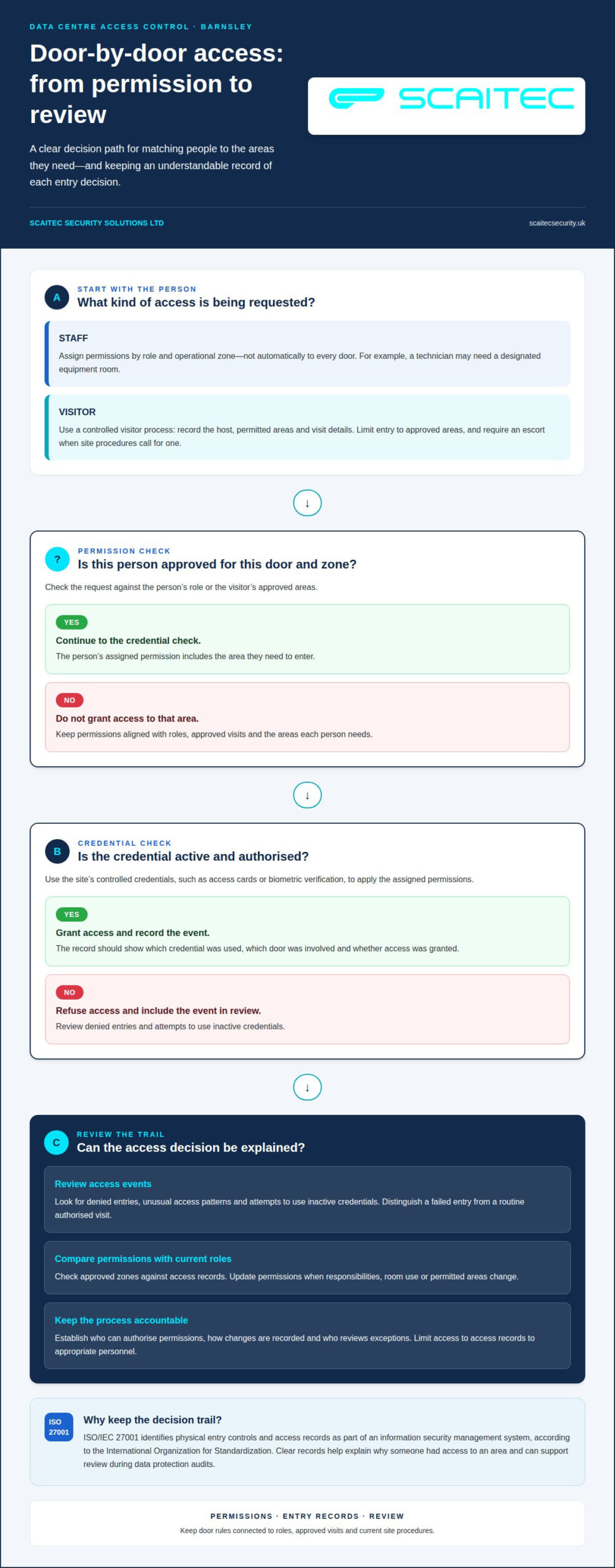
Common access risks include unauthorised entry, shared credentials and visitors reaching restricted rooms. A visitor policy should record each visit, limit access to approved areas and require an escort when site procedures call for one. Staff permissions should reflect their roles, rather than grant access to every door.
Start with a door-by-door access plan. Identify operational zones, such as reception, equipment rooms and network areas, then define which roles need access to each. A technician might need entry to a designated equipment room, while a visitor may be limited to reception and an approved meeting area. This reduces unnecessary movement and makes permissions easier to review.
ISO/IEC 27001 is a framework that expects physical entry controls and access records to form part of an information security management system, according to the International Organization for Standardization. For operators, the practical value is a documented relationship between permissions, entry points and security procedures. A system should support a clear audit trail, so authorised personnel can review who used a credential, which door was involved and whether access was granted or refused.
- Set permissions: assign access by role and zone, then remove access when responsibilities change.
- Manage visitors: record the host, permitted areas and visit details, using a controlled visitor process.
- Review events: examine denied entries, unusual access patterns and attempts to use inactive credentials.
- Keep procedures aligned: update door permissions when room use or staff responsibilities change.
Access records can help an organisation demonstrate how physical access is controlled during data protection audits. An auditor may review the permission structure, sample access events and compare records with current roles or approved visits. Clear records help explain why someone had access to a particular area and can reveal gaps, such as a former contractor’s credential remaining active after their work ends.
Good auditability depends on more than recording door events. The process should establish who can authorise permissions, how changes are recorded and who reviews exceptions. For example, a failed entry at a restricted equipment room should be distinguishable from a routine authorised visit. Access records should be handled as sensitive information, with access to the records limited to appropriate personnel. Organisations can discuss a tailored business access control system around their doors, zones and audit needs.
Log visitors through a controlled process that records the host, permitted areas and visit details. Limit access to approved areas, provide an escort where site procedures require one, and authorise and record permission changes.
Keep personnel records available for review without making them broadly accessible. Data centre zoning can assign different permissions to operational areas and restrict unnecessary movement. During a permission review, compare each role’s approved zones with the access records, and document changes when someone’s responsibilities or permitted areas change. Keeping zone definitions and permission decisions together helps reviewers understand why an entry was allowed or refused.
Access control integration and scalability
An access system needs to fit the data centre’s operating environment. Plan integration by mapping doors, user groups, control points and existing processes. For example, a site might manage staff access separately from contractor visits while applying consistent rules across reception and restricted rooms. This creates a clear basis for future changes without assuming every door needs identical controls.
Next, a professional designs the system around its connections. Readers at doors need a suitable route to the control equipment, and the management interface needs to support the information staff use to administer permissions. Cat6 is commonly used for modern commercial networks. Cat6A may suit requirements for higher bandwidth, extra capacity or longer-term performance. Fibre optic cabling can provide high-capacity connections between floors, buildings, cabinets and equipment over longer distances.
The building layout and system architecture shape these decisions. A multi-floor facility, for example, may need connections between separate equipment areas. The design should account for cable routes, access points and control equipment locations. Coordinate these requirements with the data centre team so the installation fits the environment and avoids unnecessary disruption to critical operations.
- Map the site: record controlled doors, floors, zones and the equipment locations serving them.
- Define access groups: establish which roles need which areas, including temporary users.
- Plan connections: select suitable network cabling and routes for the system layout.
- Allow for change: design administration and permissions so new doors or user groups can be added coherently.
Scalability involves more than adding readers. Each extension can affect cabling, control equipment, permissions and system administration. A new equipment room, for instance, may need its own access zone and a defined process for assigning authorised users. Planning these changes together helps maintain consistent rules as the facility evolves.
Integration also requires clear responsibilities. Establish which system manages credentials, who approves changes and how access events are reviewed. These decisions reduce confusion when departments, contractors or room functions change, and help operators understand the day-to-day access process.
For a Barnsley facility, the useful starting point is a documented view of current doors and likely expansion. A tailored business access control system can be planned around that layout, its network routes and its operational needs.
Cards, proximity fobs and PIN readers
Credential choice affects how staff enter, how permissions are managed and what happens when access changes. An access card, proximity fob or PIN reader can control a door, but each uses a different credential. Choose the arrangement to suit the entry point, its users and daily operating procedures.
An access card gives an individual a physical credential to present at a reader. Staff could use assigned cards at the staff entrance, with permissions linked to their authorised areas. If a card is lost or a role changes, administrators can update the associated permission rather than rely on a shared door code. Clear issuing and return procedures help keep each credential linked to its authorised user.
A proximity fob serves a similar purpose in a compact format. It can suit someone who regularly uses a controlled door, such as an engineer entering an approved technical area. Issue each fob to a named user, associate it with the appropriate access group and deactivate it when no longer required. Shared fobs make it harder to identify who entered.
A PIN reader requires a user to enter a code at the door. It avoids carrying a separate card or fob, but a code shared among a group cannot identify who entered. Where the system allows, assigning individual codes, controlling who receives them and changing them when access arrangements change can reduce this limitation. The reader’s position and the doorway’s use also affect whether entering a code is practical.
- Cards: suit workflows where individual physical credentials can be issued and managed.
- Fobs: offer a compact credential for regular users passing through designated doors.
- PINs: provide code-based entry, with accountability shaped by whether codes are individual or shared.
A site may use different methods at different doors. For instance, a card reader could serve a routine staff entrance, while a PIN reader controls an area used by a smaller authorised group. Base this approach on the site’s security plan rather than adding steps without purpose. Consistent names for doors and access groups also help administrators understand which credential applies at each point.
During planning, map each entrance, identify user groups and document how credentials are issued, changed and withdrawn. Consider how to handle a lost card or forgotten PIN without weakening access rules. These decisions connect physical readers to the wider digital infrastructure and help keep entry procedures workable for staff and visitors.
For data centre access control in Barnsley, the credential plan should reflect actual operations, not just the hardware selected. A professional access control system can be designed around the doors, user groups and entry methods the site needs.
Data centre access control systems: biometrics, access cards and mantraps
A data centre can combine access cards, biometric checks and mantraps to control entry at different points. Each serves a distinct purpose: a card presents a credential, a biometric reader checks identity, and a mantrap creates a controlled passage between doors. Design the system around the risks and movement patterns at each entrance, rather than applying the same arrangement everywhere.
Cards provide a familiar way to present an assigned credential at a reader. They can manage routine entry, such as staff using a designated door before reaching an operational area. Biometric access control can authenticate individuals using fingerprint or facial recognition. Alongside an access card, biometric verification adds an identity check at selected doors, such as an entrance to a restricted equipment room.
Combining methods requires a clear entry sequence. Define which credential is presented first, where identity verification takes place and what happens if a check fails. For example, a card may grant permission to approach a controlled entrance, while a biometric check verifies the person before access is released. Operators also need a procedure for unsuccessful attempts that does not weaken entry rules.
A mantrap uses a controlled space between doors to manage passage into a protected area. An entrant passes through one door, then proceeds through the second under the site’s access rules. This can help prevent unauthorised follow-through, where someone attempts to enter behind an authorised person. Placement matters: a mantrap at an inner boundary protects a different zone from one at the site perimeter.
- Perimeter entrance: use a defined credential process for staff and approved visitors.
- Restricted room: add biometric verification where the security plan calls for an additional identity check.
- Controlled passage: position a mantrap at a boundary where entry needs closer management.
These controls should work as one plan. A card can establish permission, a biometric check can verify identity, and a mantrap can regulate movement through a doorway. Explain how authorised staff, visitors and contractors use each layer. Clear procedures also help staff respond consistently when a credential is rejected or someone needs assistance.
Before installation, map the entry route, identify which doors need additional checks and document the intended user journey. For example, a visitor might be authorised for reception but not the technical area beyond it. The design should preserve that boundary while keeping permitted movement straightforward. Ongoing system maintenance helps keep readers and door controls aligned with the intended access process.
Data centre operators can also combine RFID access with biometric verification to manage permissions, monitor movement and maintain audit trails.
The Barnsley Borough Council data centre refurbishment involved replacing both the data centre cooling and UPS systems while maintaining uptime. The Barnsley Borough Council data centre remained operational during installation, allowing staff to continue working on its IT systems. An environmental monitoring system was installed as part of the refurbishment. Proposed supplementary cooling works at the South Yorkshire Global Data Centre include installing two smaller air-cooled units over a gantry system.
Compare physical access controls at Yorkshire data centres
Compare physical access controls by where they sit in a site’s entry route. A Yorkshire data centre can use full-height turnstiles at the perimeter, speed gates in reception and readers on internal doors. Each control manages a different boundary, so assess how the layers work together.
At the perimeter, full-height turnstiles control pedestrian entry before people reach the building. They suit a site entrance where the aim is to channel movement through a defined point. Compare this arrangement with the site’s vehicle access and visitor arrival process. A turnstile does not determine which rooms someone may enter after crossing the boundary.
Speed gates at reception provide a different type of control. They can direct authorised people through a monitored entrance while keeping reception separate from operational spaces. For a visitor arriving at a Barnsley facility, reception can be the first controlled transition. Then determine whether the visitor’s destination requires an escort or further access checks.
Internal-door readers manage movement between rooms and operational zones. They can apply separate permissions to offices, equipment rooms and network spaces. Unlike a perimeter turnstile, an internal reader controls specific doors and access groups, restricting a person’s movement after they have entered the building.
- Perimeter: compare how a full-height turnstile controls the site’s pedestrian entrance.
- Reception: assess whether speed gates create a clear transition from public areas.
- Internal doors: consider how readers separate staff routes from restricted rooms.
A useful comparison also considers the user journey. Staff may pass through a perimeter entrance, reception and an internal door before reaching an authorised work area. Each control should have a defined purpose. If two points apply identical checks without protecting distinct boundaries, the design may create unnecessary friction for routine movement.
For sites in Barnsley, Sheffield and the wider South Yorkshire area, compare layouts rather than assuming every facility needs the same combination. A building with controlled reception may need a different arrangement from one with several operational entrances. Map pedestrian routes, visitor arrival points and restricted areas, then decide where each control belongs. This gives the project team a practical basis for reviewing access, staff flow and audit records.
Compare proposals using the same questions: which boundary does each control protect, who uses it, and what happens after entry is granted? Clear answers distinguish perimeter control from reception management and room-level permissions. They also make future changes easier to assess as a data centre’s layout or operations evolve.
Scaitec Security Solutions Ltd: Access Control Systems
Scaitec Security Solutions provides access control systems for organisations planning a new data centre installation or reviewing existing door security. The system can be designed around the facility’s entrances, operational zones and access requirements, creating a consistent approach to authorised entry. Professional support is useful when a site changes its layout, adds controlled doors or needs its existing arrangements maintained.
For Barnsley operators, the next step is to outline the doors and areas that need control, alongside the way staff and visitors move through the building. Scaitec Security Solutions Ltd can use this information to shape an access control solution for the site. Contact Scaitec Security Solutions Ltd to discuss your requirements.
Make the next security decision with confidence
For data centre access control in Barnsley, turn the site’s access priorities into a practical project brief. Identify which entrances need control, how staff and visitors should move through the building, and who will manage changes as operations evolve. This gives Scaitec Security Solutions a clear basis for planning a system around the facility rather than relying on a generic layout.
Scaitec Security Solutions provides Access Control Systems and can also help organisations consider CCTV Systems and Intruder Alarms as part of wider physical security arrangements. These services address different aspects of site protection, so the right combination depends on the building and its security objectives. Discuss your access requirements with Scaitec Security Solutions to clarify the next steps for planning.
A considered plan makes security decisions easier to manage as the facility changes. Contact Scaitec Security Solutions to discuss your site’s access control requirements.
Protect Your Business
Protect Your People
Book Your FREE Site Protection Survey

Since pioneering Scaitec Security Solutions in 2005, Paul Scaife, with his roots in the industry dating back to 1994, has distinguished the firm as a leading provider of bespoke fire and security solutions, servicing clients across Sheffield, Rotherham, and surrounding areas.
His leadership, underpinned by accreditation from the Security Systems and Alarms Inspection Board, ensures that Scaitec surpasses client expectations by blending advanced technology with a deep understanding of their unique needs.
Paul's ethos champions innovation and efficiency, driving Scaitec to deliver tailored, cutting-edge solutions that enhance safety and operational ease.
Discover more about Paul’s commitment to excellence on LinkedIn.